
Halloween effect
Trails, Not Twins
There is already a clone effect on this site, and this is not it. A clone duplicates the person. This one leaves phantom copies trailing behind a single subject as the camera pulls back.
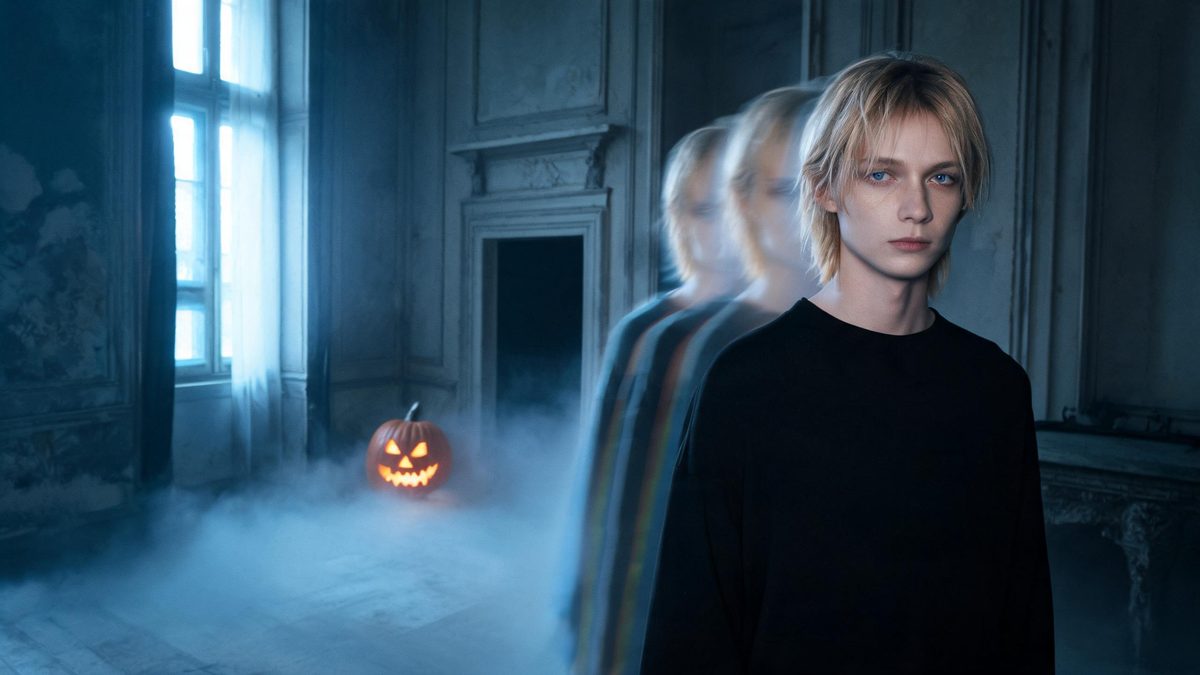
Duplication and afterimage look similar in a thumbnail and behave completely differently in motion. A clone gives you two of the same person doing the same thing. An afterimage gives you one person and a trail of where they have just been.
This template does the second. One photo of one person standing, framed half-body or full-body, comes back as a 4-second 720p clip where the subject leaves phantom copies behind as the camera pulls back, for 40 credits. There is no prompt to write.
Specs at a glance
Straight from the product panel, not from a marketing deck.
- Output
- 4-second video
- Credits
- 40 per run
- Resolution
- 720p
- Aspect ratio
- Matches your input photo
- Input
- 1 photo — one person
- Best results with
- A single person framed half-body or full-body, standing, with the whole body in shot
- Known limits
- Single subject only and no text prompt. This is an afterimage trail rather than a duplicate of the person — the subject stays one person and leaves phantom copies behind. A tight close-up is the main failure case, where the head-to-body proportions can be rebuilt wrong. If the lower body is seated or outside the frame, the camera pull-back can scramble the limbs.
What it does
Built for this specific job, not a generic editor.
An afterimage trail, not a duplicate
The subject stays one person throughout; what appears behind them is a trail. That is the entire difference from a clone effect, and it is why this reads as supernatural rather than as a crowd.
Camera pull-back built in
The move is a pull-back rather than a cut, which is what reveals the trail. It also means the whole body needs to be in frame before the move starts.
No prompt, one subject
No text field, single person only. Framing is the control you have.
Fixed 4 seconds at 720p
Published here so you know the shape of the output before spending. Four seconds is enough for the pull-back and the trail.
How it works
Four steps, no timeline to learn.
Get the whole body in frame
Standing, half-body or full-body, facing the camera. The camera pulls back during the clip, so anything outside the frame at the start is invented later — and invented limbs are where this effect breaks.
Avoid a tight close-up
A near-frame close-up is the main failure case: the head-to-body proportions can be rebuilt wrong, and the result reads as distorted rather than ghostly.
Keep the lower body visible
If the subject is seated, or the lower body falls outside the frame, the pull-back can scramble the limbs. This is the second most common failure after the close-up.
Re-frame for the second run
There is no prompt to adjust, so a wider frame is the only fix. Each run costs 40 credits, so choose the best photo first.
Where people use it
The jobs this effect actually gets used for.
A ghost effect that is not a costume
The trail does the supernatural work without putting the subject in a sheet, which is a more usable register for most Halloween posts.
A movement beat in a sequence
The pull-back gives the clip a camera move, which makes it useful as a transition between two static shots in a set.
A sports or dance frame, repurposed
A standing action frame already implies motion, and the afterimage reads as a natural extension of it rather than an added effect.
A lighter supernatural note
Where the werewolf and demon templates change the subject, this one changes the space around them. Both together give a set some range.
Why this is not the clone effect
Two of someone is a crowd. A trail of someone is a ghost.
There is already a clone template on this site, and the two are easy to confuse. The distinction is worth being precise about, because it decides which one you want: a clone gives you two subjects, an afterimage gives you one subject and a trail.
That difference is also why the framing requirements are stricter here. The effect ends on a camera pull-back, which means it needs the whole body in frame from the start — a tight close-up gets the proportions rebuilt wrong, and a seated subject or one whose lower body is outside the frame can come back with the limbs scrambled.
The rest is stated plainly: one subject, no prompt, four seconds at 720p. Those limits are what keep the output predictable at 40 credits a run.
Credits and plans
Every effect draws on one shared credit balance.
Every effect draws on the same credit balance. This one costs 40 credits per run, shown before you confirm. Free accounts receive 30 credits every month with no card and no watermark on the output.
Related guides
Longer reads on the same workflow, from the OpenFilmo blog.
Image to Video AI: Animate Any Photo in Seconds
A complete guide to image to video AI: what makes a good source image, how to write motion prompts, top use cases, and how to fix …
Character Consistency in AI Video: What Actually Works
How to keep characters consistent across AI video shots: reference images, prompt discipline, key frame locking and post-hoc corre…
AI Video Prompt Formulas That Hold Up in Production
Prompt structures that work for AI video: subject, motion, camera, time and style — with tested formulas, failure patterns and a m…
Related effects
Same family of effects, on the same kind of input.
Frequently asked questions
How is this different from the clone effect?
A clone duplicates the person. This leaves phantom copies trailing behind a single subject as the camera pulls back — the subject stays one person throughout.
Why does my result look distorted?
A tight close-up is the main failure case, where head-to-body proportions can be rebuilt wrong. Use a standing half-body or full-body frame facing the camera.
My subject is seated and the limbs look wrong.
If the lower body is seated or outside the frame, the camera pull-back can scramble the limbs. Get the whole body in frame before the move starts.
Can I use a photo of two people?
No. This template accepts a single person only, and there is no text prompt to adjust.
Can I use the clip commercially?
Yes. Output is yours to publish, including in paid posts, on every plan including the free tier. The only restriction is the source photo: use an image you own or have permission to use.