
Halloween effect
The One Effect That Takes A Group
Most Halloween templates want a single person standing in a plain frame. This one accepts a photo of one person, two people, a whole group, or an animal — and gives them all the same face.
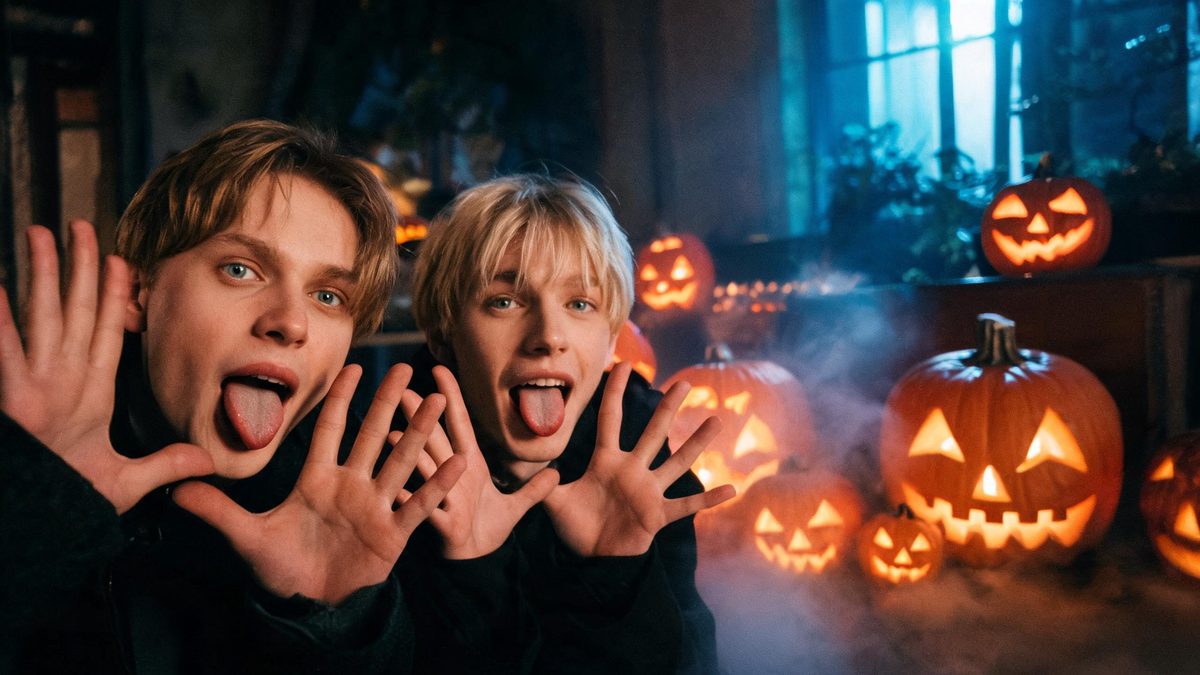
Group Halloween photos are usually the hardest thing to animate, because every extra person is another thing that can go wrong. Most templates sidestep the problem by refusing groups outright.
This one accepts them. A photo with one person, two people, several, or a pet comes back as a 4-second 720p clip where the subjects pull a face and stick out their tongues, in your source aspect ratio, for 40 credits.
Specs at a glance
Straight from the product panel, not from a marketing deck.
- Output
- 4-second video
- Credits
- 40 per run
- Resolution
- 720p
- Aspect ratio
- Matches your input photo
- Input
- 1 photo — one person, two people, a group, or an animal
- Best results with
- Subjects with empty hands — anything held in the frame competes with the gesture
- Known limits
- A text prompt is required and the generated one should be kept close to the template form. Extra hands can appear. With more than one subject, a small share of runs leave part of the group without the tongue gesture, so a group photo is the least predictable input.
What it does
Built for this specific job, not a generic editor.
Groups, couples, pets
The widest input rule in the Halloween set: one person, two, a group, or an animal. If you have a Halloween photo with several people in it, this is the template that will actually take it.
A prompt is required
Unlike most of this set, this template needs a text prompt, and the generated one should be kept close to the template form. Rewriting it freely is the fastest way to a broken gesture.
Fixed 4 seconds at 720p
Published here so the shape of the output is known before you spend. Four seconds is enough for the gesture to land.
Empty hands work best
The effect animates the face and the hands together. Anything already being held competes with the gesture and is the most common cause of a half-formed result.
How it works
Four steps, no timeline to learn.
Choose empty hands
Pick a frame where nobody is holding anything. A cup, a phone or a bag strap competes with the gesture the effect is generating, and this is the single most common reason a result comes back half-formed.
Keep faces visible and forward
The effect is working on faces. Subjects turned away, or a frame where someone is largely behind another person, give it less to animate — and with several people, partial faces are the usual failure.
Keep the prompt close to the template
This template requires a prompt and the generated one is already tuned. Adjust it lightly if you must, but do not restructure it; the gesture depends on the form.
Expect the group to be less predictable
With more than one subject, a small share of runs leave part of the group without the tongue gesture. A single-subject photo is the most reliable input; a large group is the least.
Where people use it
The jobs this effect actually gets used for.
A group Halloween photo that moves
The main reason to pick this one: it takes a photo with several people in it, which most of the set will not.
A pet Halloween clip
Animals are accepted, so the family photo can include the dog without splitting it into two runs.
A reaction for a story
Four seconds of a face is the shortest possible way to add a reaction to a post, and it needs no caption.
A light counterweight in a dark set
Run it after the werewolf and demon templates: the same photo pulling a face reads as deliberate comic relief rather than an accident.
Why the input rule is the interesting part
Most Halloween effects want one person standing alone. This one is built for the photo people actually take on the night.
Halloween photos are rarely single-subject studio frames. They are groups of friends, couples, and pets in bad light, which is exactly the input most transformation templates reject. That mismatch is why so many seasonal effects go unused.
Accepting groups costs something, and the trade is stated here: with more than one subject, a small share of runs leave part of the group without the gesture. A single-subject photo is the most predictable input and a large group the least. That is a real limitation, not a footnote.
The other constraint is the prompt. This is one of the few templates in the set that needs one, and it should be kept close to the template form — the gesture depends on the structure, so free rewriting breaks it.
Credits and plans
Every effect draws on one shared credit balance.
Every effect draws on the same credit balance. This one costs 40 credits per run, shown before you confirm. Free accounts receive 30 credits every month with no card and no watermark on the output.
Related guides
Longer reads on the same workflow, from the OpenFilmo blog.
Image to Video AI: Animate Any Photo in Seconds
A complete guide to image to video AI: what makes a good source image, how to write motion prompts, top use cases, and how to fix …
Text to Video AI: Turn Any Prompt Into Video
Learn how text to video AI works, the four-part prompt formula that produces usable clips, how to fix common failures, and where i…
AI Video Prompt Formulas That Hold Up in Production
Prompt structures that work for AI video: subject, motion, camera, time and style — with tested formulas, failure patterns and a m…
Related effects
Same family of effects, on the same kind of input.
Frequently asked questions
Can I use a group photo?
Yes — one person, two people, a group, or an animal are all accepted. With more than one subject, a small share of runs leave part of the group without the tongue gesture, so a single-subject photo is the most predictable input.
Do I need to write a prompt?
Yes. This is one of the few templates in the Halloween set that requires a text prompt, and the generated one should be kept close to the template form rather than rewritten freely.
Why do extra hands appear?
In a small share of runs the effect generates extra hands. It animates the face and hands together, so a frame with empty hands and clearly visible faces gives it the best information.
What kind of photo works worst?
Subjects already holding something, faces turned away, and people largely hidden behind one another. All three remove information the effect needs to place the gesture.
Can I use the clip commercially?
Yes. Output is yours to publish, including in paid posts, on every plan including the free tier. The only restriction is the source photo: use an image you own or have permission to use.