
Halloween effect
The Change Happens On Camera, Not In Costume
A werewolf costume is a purchase, a fitting and one night of the year. This effect is a single standing photo and four seconds of video: the subject changes on camera, fur and all, with no prompt to write and nothing to buy.
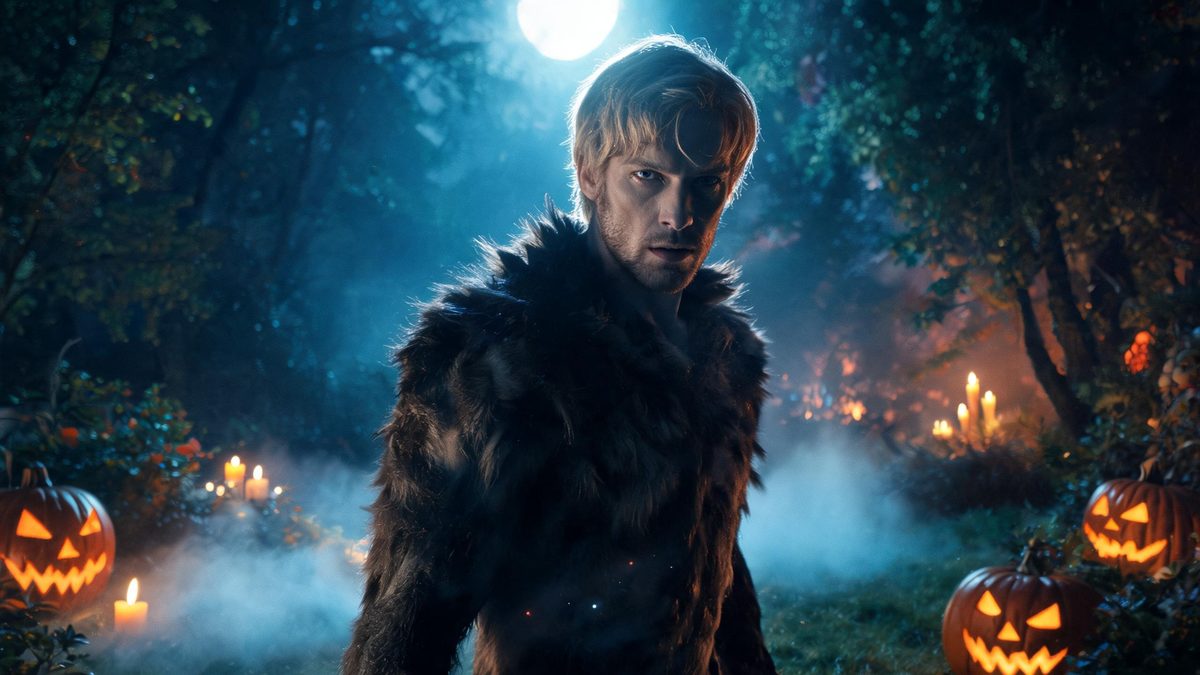
Most transformation effects fail in the same place: the head changes but the body underneath does not, so the result reads as a mask rather than a change. The giveaway is always the shoulders — a costume sits on top of a person, while a real transformation changes the silhouette.
This template works on the whole frame. You upload one photo of a single person and the effect rebuilds the subject across four seconds at 720p, in the aspect ratio of your source photo, for 40 credits per run. There is no text prompt at all, which means your photo is the only thing you control: framing, lighting and posture decide how the change lands.
Specs at a glance
Straight from the product panel, not from a marketing deck.
- Output
- 4-second video
- Credits
- 40 per run
- Resolution
- 720p
- Aspect ratio
- Matches your input photo
- Input
- 1 photo — one person
- Best results with
- A single person standing, framed half-body or full-body, facing the camera
- Known limits
- Single subject only — the template does not accept a two-person photo. There is no text prompt at all, so your source photo is the only control you have: framing, lighting and posture decide how the change lands. Background music is off unless the API request turns it on.
What it does
Built for this specific job, not a generic editor.
The silhouette changes, not just the face
Because the whole subject is regenerated rather than overlaid, the shoulders and posture shift with the change. That is what separates a transformation from a filter, and it is why a full or half-body frame matters more than a sharp face.
No prompt to write
There is no text field on this template. You are not describing a werewolf; you are supplying a person for one to appear from. For anyone who has spent an evening rewording a prompt to get a usable result, this is the more reliable arrangement.
Fixed 4 seconds, fixed 720p
Four seconds is long enough for a change to read as a change and short enough that the motion never has time to drift. The resolution and length are fixed and published here, so you know the shape of the output before you spend anything.
Music is off unless you ask
Background music defaults to false on the API and has to be switched on in the request. The clip arrives silent, which is usually what you want if you are dropping it into an edit with your own audio.
How it works
Four steps, no timeline to learn.
Choose a standing photo
Pick a frame where one person is standing and facing the camera, framed half-body or full-body. A seated subject gives the effect very little to work with, and a tight head-and-shoulders crop removes the shoulders that make the change believable.
Keep the frame simple
A plain background and even lighting give the model a clean subject to rebuild. Busy patterns behind the person tend to get pulled into the transformation and come back as artefacts around the edges.
Check the shoulders first
When the result comes back, look at the shoulders before the face. If the silhouette reads as changed, the clip will hold up on a second viewing. If only the face changed, the source framing was too tight.
Re-frame rather than re-prompt
Because there is no prompt, the only lever you have is the photo. A second run with a wider frame almost always beats a second run with the same photo, and each attempt costs 40 credits.
Where people use it
The jobs this effect actually gets used for.
A Halloween post that is not a selfie
The clip posts straight to a story or feed with no editing. It reads as a moment rather than a costume photo, which is the register people actually want on the night.
A party invitation that moves
Four seconds is short enough to send as an attachment and clear enough that the recipient understands the theme without a caption explaining it.
A character reference for a shoot
Creators planning a real werewolf setup use this to preview how the silhouette reads on camera before committing to prosthetics and a makeup call time.
A season opener for a series
Run the same photo through several Halloween templates to build a short sequence. Consistent framing across the set makes the series feel deliberate rather than assembled.

Why a full-body rebuild beats a face filter
A filter changes a face. A transformation has to change the person standing under it.
Face filters are convincing in a still and fall apart the moment the subject moves, because nothing below the neck has changed. The eye reads the mismatch instantly even when it cannot name it.
Rebuilding the whole subject avoids that, but it raises the bar on the input: the effect needs to see enough of the person to rebuild them. That is why a standing half-body or full-body frame is listed as the best-case input rather than a nice-to-have, and why a head-and-shoulders crop is the most common source of a disappointing result.
The trade-off is stated plainly on this page: no prompt, one subject only, and a fixed four seconds at 720p. Those are the constraints, and they are the reason the effect is predictable enough to be worth 40 credits.
Credits and plans
Every effect draws on one shared credit balance.
Every effect draws on the same credit balance. This one costs 40 credits per run, shown before you confirm. Free accounts receive 30 credits every month with no card and no watermark on the output.
Related guides
Longer reads on the same workflow, from the OpenFilmo blog.
Image to Video AI: Animate Any Photo in Seconds
A complete guide to image to video AI: what makes a good source image, how to write motion prompts, top use cases, and how to fix …
Character Consistency in AI Video: What Actually Works
How to keep characters consistent across AI video shots: reference images, prompt discipline, key frame locking and post-hoc corre…
AI Video Prompt Formulas That Hold Up in Production
Prompt structures that work for AI video: subject, motion, camera, time and style — with tested formulas, failure patterns and a m…
Related effects
Same family of effects, on the same kind of input.
Frequently asked questions
Can I use a photo of two people?
No. This template accepts a single person only. A two-person photo is not accepted by this effect, so choose a frame with one subject standing and facing the camera.
Do I need to write a prompt?
No. There is no text prompt on this template at all. Your source photo is the only input you control, which means framing, lighting and posture decide how the change lands.
Why is the result 4 seconds at 720p?
Four seconds at 720p is the fixed specification of this effect, published here so you know before you spend credits. It is long enough for the change to read as a change and keeps the cost at 40 credits per run.
What kind of photo works worst?
A tight head-and-shoulders crop, a seated subject, and busy patterned backgrounds. The first two remove the body the effect needs to rebuild; the third tends to bleed into the transformation around the edges.
Can I use the clip commercially?
Yes. Output is yours to publish, including in paid posts, on every plan including the free tier. The only restriction is the source photo: use an image you own or have permission to use.