
Halloween effect
A Full Outfit Change, Standing And Facing Forward
Fairy styling is wings, dress and posture together, which is why overlay effects struggle with it. This one restyles the whole subject from a single standing photo in four seconds.
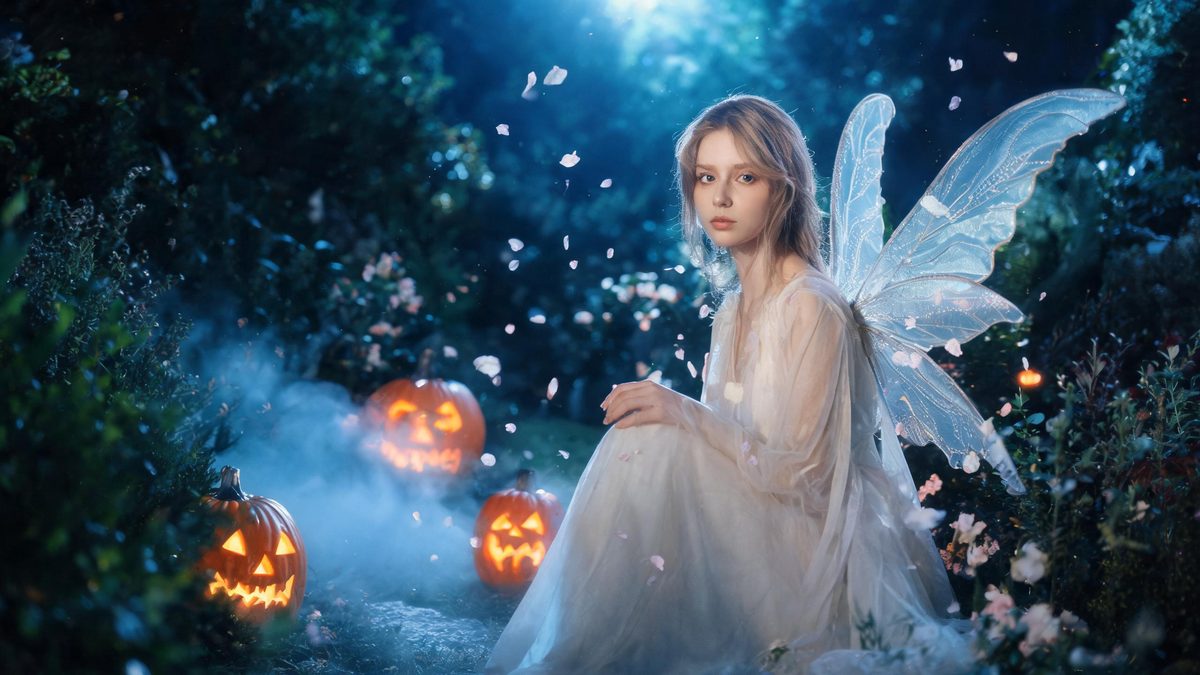
Wings are the giveaway. Paste them onto a photo and they sit on the surface, with no weight and no relationship to the shoulders they are supposedly attached to. The only way around that is to rebuild the subject rather than dress them.
This template does the rebuild. One photo of one woman, standing and facing the camera, comes back as a 4-second 720p clip in a fairy look, in your source aspect ratio, for 40 credits. A text prompt is required.
Specs at a glance
Straight from the product panel, not from a marketing deck.
- Output
- 4-second video
- Credits
- 40 per run
- Resolution
- 720p
- Aspect ratio
- Matches your input photo
- Input
- 1 photo — one woman
- Best results with
- A standing pose, no props in the hands, full body visible and facing the camera
- Known limits
- Female subjects only by design: a photo of a man is still read as a woman and dressed in the fairy outfit, so this is not a usable input for masculine styling. A text prompt is required. Parts of the original clothing can survive into the result instead of being fully replaced.
What it does
Built for this specific job, not a generic editor.
Rebuilt rather than overlaid
The wings and the dress are generated with the body rather than pasted onto it, so they carry weight and sit correctly at the shoulders — the detail that separates this from a sticker.
No props in the hands
The template asks for a standing pose with nothing held. Hands holding something are the most common reason the restyle comes back incomplete.
A prompt is required
This is one of the templates in the set that needs a text prompt, and the generated one should be kept close to the template form.
Fixed 4 seconds at 720p
Published here so the shape of the output is known before you spend. Four seconds is enough for the change to read.
How it works
Four steps, no timeline to learn.
Stand, face forward, nothing in hand
The best-case input is specific: a standing pose, no props in the hands, full body visible and facing the camera. Each of those four matters.
Show the full body
The outfit runs the length of the subject. A frame cut off at the waist gives the effect half a person to restyle and the lower half will be invented.
Keep the prompt close to the template
A prompt is required here and the generated one is already tuned. Adjust lightly if you must, but keep the structure — free rewriting is the usual cause of a broken result.
Expect some original clothing to survive
Parts of the original outfit can remain in the result rather than being fully replaced. A simple, plainly lit outfit gives the restyle the cleanest starting point.
Where people use it
The jobs this effect actually gets used for.
A costume look with nothing to buy
The point of a styling effect: see the full look — wings, dress and all — before spending money on an outfit worn once.
A Halloween post that is not a mirror photo
Four seconds of movement reads as an event rather than an outfit picture, and posts as-is with no editing.
A decision aid before a real costume
Run a photo through this first and see whether the direction suits the subject before committing to a purchase.
The lighter half of a Halloween set
Pair it with the werewolf or demon templates: the same photo in both registers reads as a deliberate range rather than an accident.
Why the pose list is unusually strict
Four conditions on one photo sounds fussy. For a full outfit rebuild, all four are load-bearing.
Standing, facing forward, full body visible, nothing in the hands — that is a stricter input than most of this set asks for, and it is not arbitrary. A rebuild that runs head to toe needs head to toe in frame, and hands holding something leave the effect to guess what is underneath.
The subject rule is worth stating plainly too: this template is built for female subjects by design. A photo of a man is still read as a woman and dressed in the fairy outfit, so it is not a usable input for masculine styling. That is a design decision in the template, not something a different photo will change.
The remaining constraints are the honest ones: a prompt is required and should stay close to the template form, parts of the original clothing can survive into the result, and the output is fixed at four seconds and 720p.
Credits and plans
Every effect draws on one shared credit balance.
Every effect draws on the same credit balance. This one costs 40 credits per run, shown before you confirm. Free accounts receive 30 credits every month with no card and no watermark on the output.
Related guides
Longer reads on the same workflow, from the OpenFilmo blog.
Image to Video AI: Animate Any Photo in Seconds
A complete guide to image to video AI: what makes a good source image, how to write motion prompts, top use cases, and how to fix …
Character Consistency in AI Video: What Actually Works
How to keep characters consistent across AI video shots: reference images, prompt discipline, key frame locking and post-hoc corre…
Best AI Video Generators 2026: 15 Tools Tested
We tested 15 AI video generators on the same prompts and ranked them for 2026. Compare quality, speed, credit pricing and commerci…
Related effects
Same family of effects, on the same kind of input.
Frequently asked questions
Can I use a photo of a man?
This template is built for female subjects by design. A photo of a man is still read as a woman and dressed in the fairy outfit, so it is not a usable input for masculine styling.
Why is part of the original clothing still there?
Parts of the original outfit can survive into the result rather than being fully replaced. A simple, plainly lit outfit gives the restyle the cleanest starting point.
Do I need to write a prompt?
Yes. A text prompt is required on this template, and the generated one should be kept close to the template form rather than rewritten freely.
What is the ideal source photo?
A standing pose, no props in the hands, full body visible and facing the camera. Frames cut off at the waist give the effect half a person to restyle.
Can I use the clip commercially?
Yes. Output is yours to publish, including in paid posts, on every plan including the free tier. The only restriction is the source photo: use an image you own or have permission to use.