
Halloween effect
Clown Makeup You Do Not Have to Apply
Clown makeup takes an hour to put on and longer to remove. Upload one photo and the render handles the paint, the light and the setting.
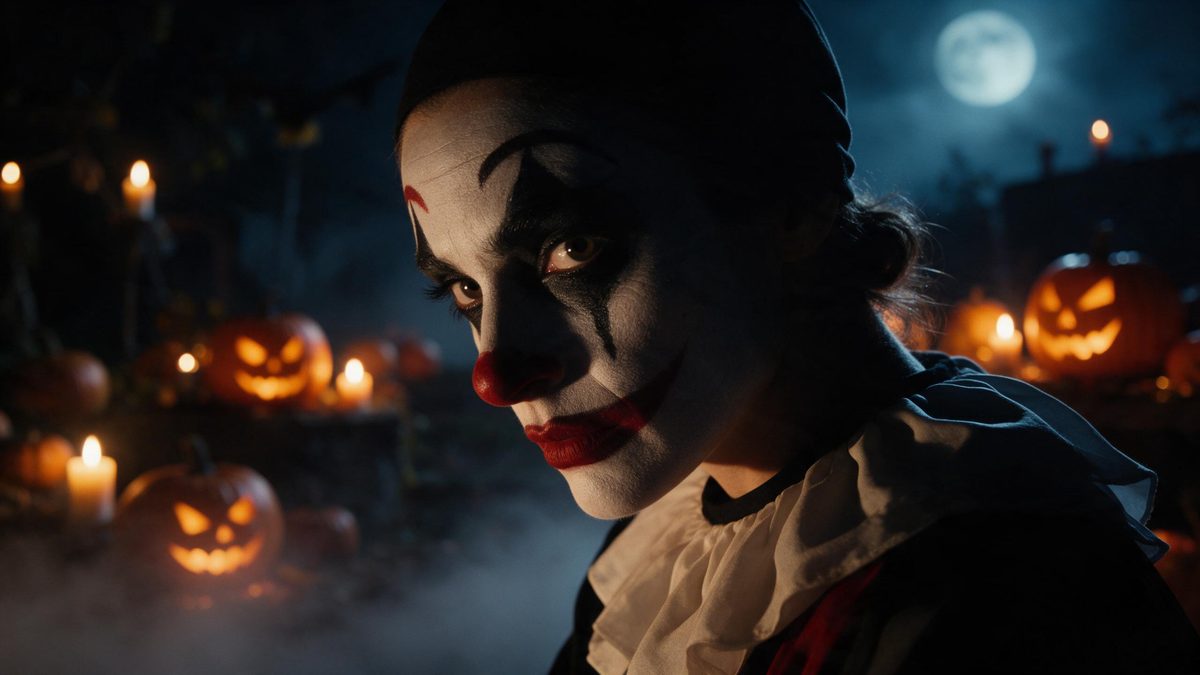
Clown makeup is one of the few Halloween looks that genuinely takes an hour. There is the base going on, the detail around the eyes, the mouth, and then the same length of time again with a wipe at the end of the night, by which point most of it has already smudged. This template skips all of that. One photograph goes in, and a five-second 1080p clip of the person wearing the makeup comes out.
The input is one photo containing one person, framed half-body or full-body at a medium or close distance, and the finished clip keeps the proportions of your source. Very occasionally the subject can read slightly out of scale against the background behind them. A frame with room around the person, shot against a plain surface rather than a busy one, gives the makeover the most to work with.
Specs at a glance
Straight from the product panel, not from a marketing deck.
- Output
- 5-second video
- Credits
- 80 per run
- Resolution
- 1080p
- Aspect ratio
- Matches your input photo
- Input
- 1 photo — one person
- Best results with
- Half-body or full-body shots, framed medium or close
- Known limits
- Very occasionally the subject can look out of proportion against the background.
What it does
Built for this specific job, not a generic editor.
Makeup without the hour
The paint, the lighting and the setting are produced in the render. Nothing goes on your face, nothing needs removing at midnight, and nobody has to sit still while someone works near their eyes. The entire preparation step disappears.
Five seconds, full HD
Each run returns a 5-second 1080p clip. The length suits a story or a looping post, and full HD keeps the detail around the eyes and the mouth readable on a phone screen. Colour survives compression well.
One photo, one person
The template takes a single photo with one person in it, framed half-body or full-body at medium or close range. One clear subject is what lets the effect place the makeup accurately on the features. Two faces would leave it a choice to make.
Shape carried over
The aspect ratio matches your input photo, so what you framed is what you get. A tall source exports tall for stories, and a wide one exports wide for a page or a feed. No crop step sits between the download and the post.
How it works
Four steps, no timeline to learn.
Pick a clean portrait
Choose one photo with a single person, framed half-body or full-body at a medium or close distance. Even light across the face and a plain background give the makeover the clearest starting point. Avoid anything covering the eyes.
Upload it
Open Scary Clown Makeup and add the photograph. There is no makeup kit to buy and no mirror to work in front of, because the paint and the setting are generated inside the render. Preparation amounts to choosing the file.
Confirm the spend
One run costs 80 credits, and the figure appears on the confirmation step before anything is spent. The Free plan gives 30 credits a month with no credit card attached, and paid tiers cover repeated attempts. Check the balance first.
Download the clip
Save the 1080p file and post it. The proportions follow your source photo, so a vertical portrait arrives as a vertical clip with nothing to trim afterwards. It is ready for a story straight away.
Where people use it
The jobs this effect actually gets used for.
A look decided late
Clown makeup bought on the 30th is either expensive or already sold out. A render from a photo you already have removes the shopping entirely and still lands before the evening is over. Nothing depends on a delivery slot.
Trying variants
Paint one face and you are committed to it for the whole night. Rendering several takes from the same photo lets you keep the one that actually works and discard the rest quietly. Each run is a separate take.
Posts for a mixed audience
A short clip reads as seasonal fun without lingering on anything unpleasant. Keep the framing wide and the caption light, and it suits a workplace or a community page. Nothing in the scene needs a warning.
Paired with a still
Several Halloween effects output a still image as well as a clip. Render both and use the still as a thumbnail or a profile picture and the clip as the post itself. One photograph covers two placements.
Why a makeover is the right job for a render
The craft is in the application, and that is the part you can skip.
Clown makeup is a skill. Applied badly it looks like face paint; applied well it changes how a face reads, mostly through the shape around the eyes and the line of the mouth. Learning that takes practice most people are not going to put in for one night a year. Paying someone else to do it costs more than the costume does. Handing the job to a render sidesteps the learning curve entirely, because the application step is exactly the part being generated.
What the effect needs in exchange is a clear, unobstructed face. Half-body or full-body, framed medium or close, is the published guidance, and it makes sense: the render has to find the features before it can change what surrounds them. A distant shot of a group, or a face in deep shadow, gives it very little to anchor to. One person, well lit, is the whole requirement, and most phone photographs already meet it.
The compromise is the same one across this group of effects. Very occasionally the subject can read slightly out of scale against the background, and it is easier to see on a cluttered crop. Beyond that the output is stable: five seconds, 1080p, matching your input shape, with no hourly rate to pay and no removal step at the end of the evening. Two renders from one photograph still cost less than one hired makeup artist.
Credits and plans
Every effect draws on one shared credit balance.
Every effect on the site draws from the same balance. Scary Clown Makeup costs 80 credits per run, and that number is shown on the confirmation step before you spend anything. A Free account gets 30 credits each month and no credit card is required; paid tiers start at Starter, $9 for 400 credits, then Pro at $19 for 1,000 and Studio at $59 for 4,000.
Related guides
Longer reads on the same workflow, from the OpenFilmo blog.
AI Video Prompt Formulas That Hold Up in Production
Prompt structures that work for AI video: subject, motion, camera, time and style — with tested formulas, failure patterns and a m…
Character Consistency in AI Video: What Actually Works
How to keep characters consistent across AI video shots: reference images, prompt discipline, key frame locking and post-hoc corre…
AI Video Cost Per Minute: The Real Numbers in 2026
How to calculate true AI video cost per finished minute: generation price, regeneration waste, edit time and iteration, with worke…
Related effects
Same family of effects, on the same kind of input.
Frequently asked questions
Do I need to wear makeup for the photo?
No. Upload an ordinary photograph and the makeup is generated in the render. Nothing is applied to the person, so there is no preparation beforehand and no removal at the end of the night. A plain, well-lit portrait is all it needs.
What framing does it want?
One photo with one person, framed half-body or full-body at a medium or close distance. Even light on the face helps, and some space around the subject reduces the rare proportion issue with the background. Keep the eyes uncovered. Avoid a face turned away from the camera as well.
What are the output specs?
A 5-second video at 1080p, in the same aspect ratio as the photo you uploaded. There is no crop step, so what you framed in the source is what appears in the finished file. It also loops cleanly inside a feed.
How many credits does it cost?
Eighty credits per run, displayed before you confirm and charged only once you have done so. The Free plan includes 30 credits monthly without a card, and the paid tiers raise the allowance if you want to try several variants.
Does every render come out identical?
No. Running the same photograph again produces another take rather than a copy, which is useful when the first result is close to what you wanted but not quite right for posting. Expect variation between runs, not duplicates. Several takes from one photograph is a normal way to work.