
Halloween effect
A Studio-Style Clown Portrait From One Photo
A single still rather than a clip, built around one photograph and returned in the same shape as the photo you uploaded.
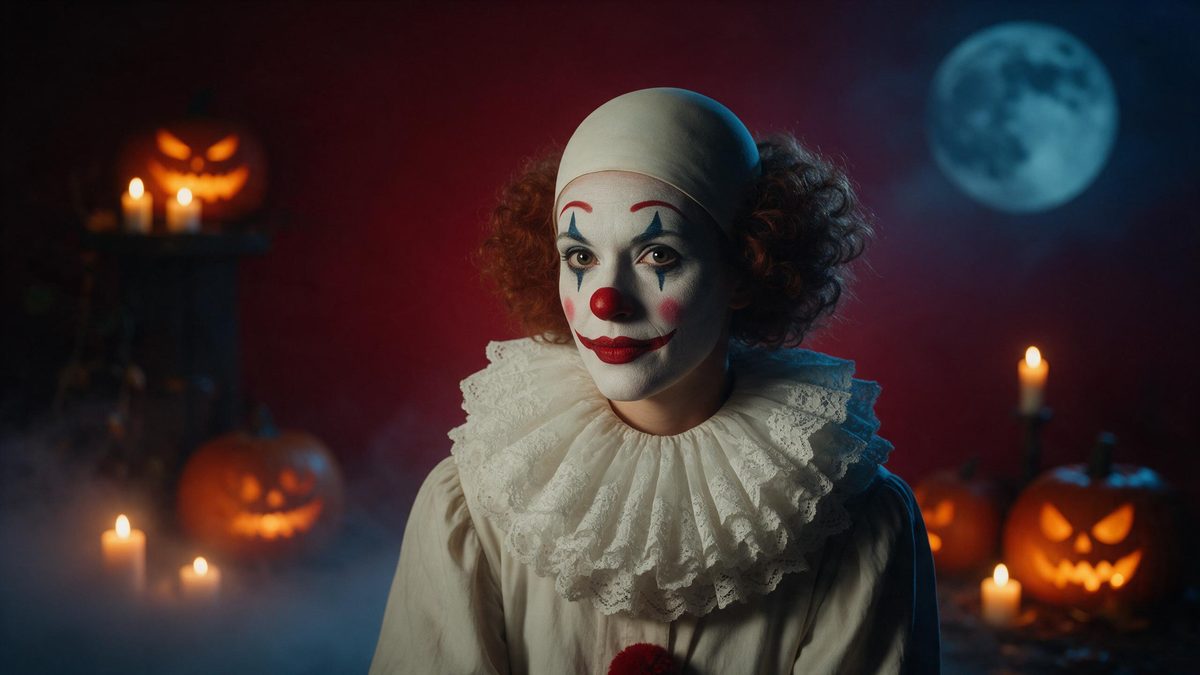
This is a portrait effect rather than a scene effect. Upload one photograph of a woman, framed half-body or full-body, and the render returns a single 1080p still in the same aspect ratio as your source. It costs 20 credits a run, which places it with the other still outputs at the cheap end of the Halloween set. One photograph is the entire input, and there is no timeline to assemble.
Keeping the input’s aspect ratio is the distinguishing detail here. Unlike the other still effects in this set, which are composed as vertical 9:16 frames, this one follows whatever shape your photograph already had. One limitation is recorded, and it is minor: very occasionally the legs overlap. A half-body or full-body shot with the figure clearly separated from the background gives the cleanest result.
Specs at a glance
Straight from the product panel, not from a marketing deck.
- Output
- Still image
- Credits
- 20 per run
- Resolution
- 1080p
- Aspect ratio
- Matches your input photo
- Input
- 1 photo — one woman
- Best results with
- A half-body or full-body shot
- Known limits
- Very occasionally the legs overlap.
What it does
Built for this specific job, not a generic editor.
A still, not a clip
The output is a single 1080p image. Use it where one frame is what you need: a profile picture, a story card, a poster panel or a thumbnail for a longer post. It arrives finished, with no playback to sit through.
Keeps your photo’s shape
Unlike the other still effects in this set, which compose a vertical 9:16 frame, this one returns the image in the aspect ratio of the photograph you uploaded. Nothing is reshaped at all. That suits a photograph whose proportions you already like.
Twenty credits a run
At 20 credits this sits among the cheapest effects in the Halloween set. Trying two or three takes from the same photograph costs less than a single video render elsewhere in the set. Several versions of the same photograph cost very little to try.
Half-body or full-body input
Upload one photo of a woman, framed half-body or full-body. The specification is for one photograph and one subject, so crop anything else out before you upload it. A half-body or full-body framing is what the template asks for.
How it works
Four steps, no timeline to learn.
Choose the photograph
Pick one image of a woman framed half-body or full-body. Since the output keeps your aspect ratio, the shape you upload is the shape you get back at the end.
Upload it
Open Creepy Clown Portrait and add the photograph. The makeup, the styling and the lighting are produced in the render, so there is nothing to apply beforehand or remove afterwards.
Confirm the cost
Each run costs 20 credits, shown before you confirm. The Free plan includes 30 credits each month with no credit card required, which covers the first attempt at the look.
Download the image
Save the 1080p still and use it. Because it keeps the proportions of your source photograph, there is no crop step between the download and the post. It is ready for a profile slot the moment it saves.
Where people use it
The jobs this effect actually gets used for.
Profile pictures for October
A single portrait slots into a profile without needing to be square or vertical, because the effect keeps whatever shape your photograph already had. Change it back in November without touching the rest of the account.
Story and post covers
A still works as the cover frame for a story sequence or a longer post. Add your own text over the top and the portrait becomes a card rather than just a picture.
Paired with a clown clip
The clown makeup effect in this set returns a five-second video. Render both from the same photograph and use the still as the thumbnail for the clip. Both come from the same photograph, so the two share a look.
Low-cost experiments
At 20 credits a run, this is an inexpensive way to see how the Halloween set treats your photograph. Do that before committing 80 credits or more to a video from the same source.
Why a portrait still is worth its own effect
One frame, your proportions, a fifth of the price.
A portrait is judged differently from a scene. It is looked at for longer, usually at close range, and its job is to make one subject interesting rather than to establish a place. That is a different problem from the ones the video effects in this set solve. It is better served by a single frame produced for the purpose than by a still grabbed out of a five-second clip, and it costs a fifth as much.
The aspect ratio behaviour is worth understanding before you choose between the still effects here. Some compose a fixed 9:16 vertical frame, which is right when you know the image is going into a story. This one returns the shape of your photograph instead, which suits a source that already has the proportions you want. Decide by thinking about where the image is going. A fixed vertical frame suits a story, and a preserved shape suits a profile.
One limitation is recorded, and it is small: very occasionally the legs overlap. That is more likely when the figure is tightly framed against a busy background, so a half-body or full-body shot with some separation from whatever sits behind it tends to come out cleaner. Everything else about the output is fixed: a 1080p still, one subject, and 20 credits a run. Two runs from the same photograph rarely come out identical.
Credits and plans
Every effect draws on one shared credit balance.
Still effects are the cheapest way into this set, and this one costs 20 credits per run, shown before you confirm. All effects share one balance. Free accounts receive 30 credits monthly and no card is required; Starter is $9 for 400 credits, Pro is $19 for 1,000 and Studio is $59 for 4,000.
Related guides
Longer reads on the same workflow, from the OpenFilmo blog.
How to Use Vidu: A Practical Guide
How to use Vidu: reference-to-video workflow, keeping subjects consistent across shots, prompt approach, and where it fits compare…
AI Video Prompt Formulas That Hold Up in Production
Prompt structures that work for AI video: subject, motion, camera, time and style — with tested formulas, failure patterns and a m…
AI Content Labeling Rules: What You Must Disclose in 2026
What AI content labelling rules require: what to disclose, where human review is mandatory, and how platform rules differ from law…
Related effects
Same family of effects, on the same kind of input.
Frequently asked questions
Does this produce a video?
No. The output is a single 1080p still image in the aspect ratio of your photograph. If you want a clown clip instead, the scary clown makeup effect in this set returns a five-second video. This template produces one finished frame and nothing else.
What photograph should I upload?
One photo of a woman, framed half-body or full-body. That is the specification for this template. Some separation between the figure and the background helps, since the legs can very occasionally overlap. Even light across the figure helps the render place the styling.
How many credits does it cost?
Twenty credits per run, displayed on the confirmation step before anything is spent. Free accounts receive 30 credits monthly with no credit card, so the first render is covered by that allowance. Nothing is deducted until you confirm on that step.
Will the output be vertical?
It follows your photograph. Unlike some other still effects in this set, which compose a fixed 9:16 vertical frame, this one returns the image in whatever aspect ratio you uploaded. A tall source therefore stays tall, and a square one stays square.
What is the known limitation?
Very occasionally the legs overlap. It is uncommon, and choosing a half-body or full-body shot with space between the figure and the background behind it is usually enough to avoid it. It remains rare, and nothing else about the output changes.