
Halloween effect
A Pumpkin Head Swap for One, Two, or a Pet
The most forgiving entry point in the Halloween set: it accepts a photo with one person, two people, or a pet, and returns a short clip.
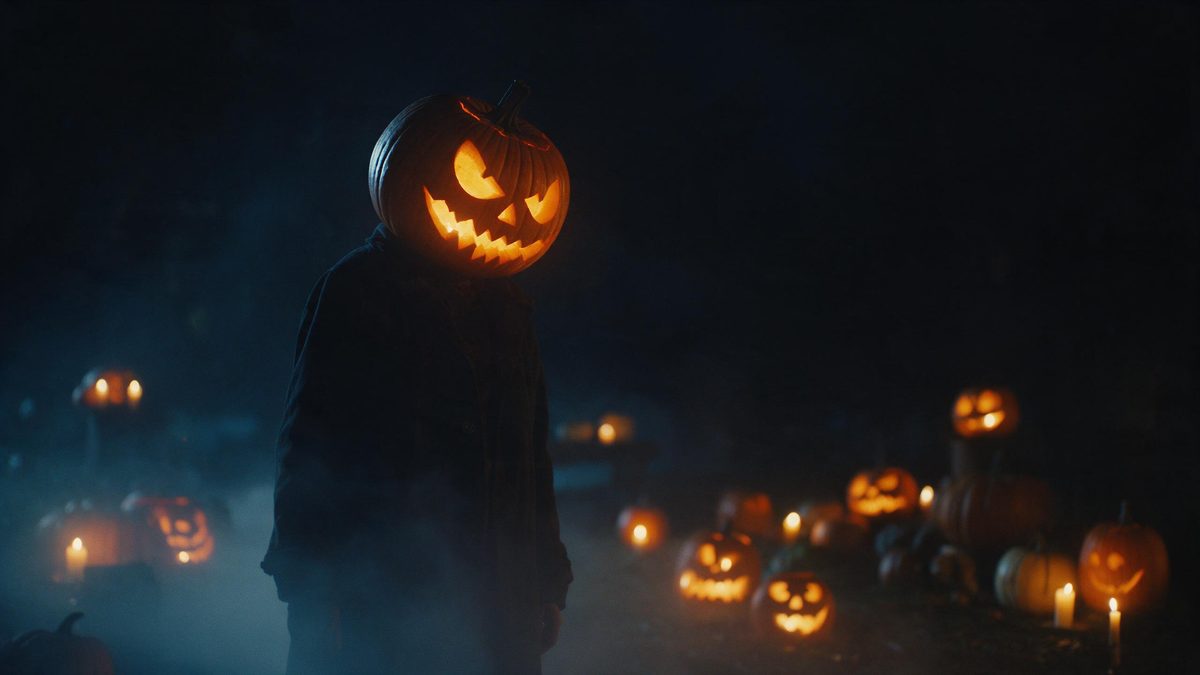
Most effects in this set are strict about there being exactly one person in the photograph. Pumpkin Head is the exception: it accepts one photo containing one person, two people, or a single pet, which makes it the easiest one to start with if you are not sure what you have to hand. Upload a half-body or full-body shot and the render swaps the heads for carved pumpkins. The output is a five-second 1080p clip for 80 credits.
The result keeps the aspect ratio of whatever you uploaded, so nothing is cropped or stretched at the edges. Two limitations are recorded for it: clothing can occasionally blend incorrectly through the change, and the scene cut can look abrupt at the end. Both are more likely with a cluttered frame, so a plain background and a clear outline around the subject are worth the extra minute. One photograph is the whole input.
Specs at a glance
Straight from the product panel, not from a marketing deck.
- Output
- 5-second video
- Credits
- 80 per run
- Resolution
- 1080p
- Aspect ratio
- Matches your input photo
- Input
- 1 photo — one or two people, or one pet
- Best results with
- A half-body or full-body shot
- Known limits
- Occasionally clothing blends incorrectly through the change, and the scene cut can look abrupt.
What it does
Built for this specific job, not a generic editor.
One, two, or a pet
The template accepts a single photo with one person, with two people, or with one pet. That flexibility makes it the practical first choice when you are working from whatever photograph is already on your phone. Few other effects here are this forgiving.
Five seconds at 1080p
Each run returns a 5-second video at 1080p. The carved detail and the light inside the pumpkin are what carry the shot, and full HD keeps both readable on a small screen. Nothing needs trimming afterwards.
Half-body or full-body
A half-body or full-body framing is what the effect asks for. More of the figure in shot means the clothing and the outline have somewhere to go when the swap happens. A crop at the neck leaves it nothing to build on.
Shape follows the source
The aspect ratio matches your input photograph, so a vertical phone shot exports vertical and a landscape shot exports wide. There is no reformatting step after the render has finished. What you framed is what you publish.
How it works
Four steps, no timeline to learn.
Pick a half-body shot
Choose one photo with one person, two people, or one pet, framed half-body or full-body. A plain background helps, because clothing can occasionally blend through the change and a busy frame makes that worse. Even light helps too.
Upload it
Open Pumpkin Head and add the photograph. The pumpkin, the light inside it and the setting are all produced in the render, so nothing needs to be carved, bought or lit by you beforehand. One upload is all it takes.
Confirm the cost
One run costs 80 credits and the figure appears before you confirm. Free accounts receive 30 credits a month with no credit card required, which covers a small number of tries and no more. Check the balance first.
Download and post
Save the 1080p clip and use it. The proportions mirror your source photo, so a vertical shot is ready for a story without any cropping afterwards. Keep the file beside the original photograph.
Where people use it
The jobs this effect actually gets used for.
Two people in one frame
Couples and siblings rarely get a seasonal clip together without setting up a tripod first. One photo with both people in it works here, and the swap applies to the pair rather than to one of you. Nobody is left out of frame.
The family pet
A pet photograph works as the input, which means the animal gets into the seasonal post without a costume. A full-body frame of the animal is what the template asks for here. Nothing needs to stay still.
Posts early in the month
Interest in Halloween builds across October and falls away immediately after the 31st. Post in the first half of the month so the clip has time to be seen and forwarded. Early posts travel further than late ones.
Thumbnails and stills
Use a frame from the clip as a thumbnail for a longer post, or pair it with one of the still-image effects in the same set. One photograph then covers both placements at once. The two end up sharing a look.

Why this one is the easiest place to start
Fewer input rules, two honest weaknesses.
Most effects in the Halloween set want exactly one person, framed a particular way, and will quietly produce something odd if you hand them a pair or an animal. Pumpkin Head is specified for one person, two people, or one pet, which removes the most common reason a first attempt fails. That reason is simply that the photograph you have is not the one the template wanted. If you are working from a camera roll rather than planning a shoot, that flexibility is worth more than any single feature here.
The head swap is forgiving because a pumpkin is a simple shape with a strong silhouette. It reads instantly at thumbnail size, which is where most seasonal clips are actually judged, and the carved detail carries the Halloween signal without a costume or a location. A half-body or full-body framing is enough for it. The render handles the head, the light and the setting around it. That is why a partial framing causes more trouble here than the subject itself does.
Two limitations are recorded and both are worth knowing before you start. Clothing can occasionally blend incorrectly through the change, and the scene cut can look abrupt at the end of the five seconds. A plain background and a clear outline around the subject reduce both. Neither affects the length or the resolution: every run is five seconds at 1080p in the shape of your source photograph. Running the same photograph again gives you another take rather than a duplicate.
Credits and plans
Every effect draws on one shared credit balance.
Every effect on OpenFilmo draws from one credit balance. Pumpkin Head costs 80 credits per run, and the cost is shown on the confirmation step before anything is spent. The Free tier carries 30 credits a month and asks for no card; Starter is $9 for 400 credits, Pro $19 for 1,000 and Studio $59 for 4,000.
Related guides
Longer reads on the same workflow, from the OpenFilmo blog.
Image to Video AI: Animate Any Photo in Seconds
A complete guide to image to video AI: what makes a good source image, how to write motion prompts, top use cases, and how to fix …
AI Video Prompt Formulas That Hold Up in Production
Prompt structures that work for AI video: subject, motion, camera, time and style — with tested formulas, failure patterns and a m…
AI Anime Video Generator: Text or Image to Anime
How to use an AI anime video generator: a script-to-anime workflow, character consistency with reference images, style options and…
Related effects
Same family of effects, on the same kind of input.
Frequently asked questions
Can I use a photo with two people?
Yes. Unlike most effects in this set, Pumpkin Head accepts one photo containing one person, two people, or one pet. That makes it the safest first attempt if you have not yet decided what to upload. Crop down to a single subject if you can.
What framing should the photo be?
Half-body or full-body. A plain background helps, because clothing can occasionally blend incorrectly through the change and a busy frame makes that more likely to show up. Some space around the subject helps, and even light is worth having. Avoid a frame cropped tightly at the neck.
How long is the clip and what resolution?
Five seconds at 1080p, in the same aspect ratio as the photo you uploaded. A tall source produces a tall clip, so there is nothing to crop before posting it to a story or a feed. The file is small enough for email.
What does one run cost?
Eighty credits, shown on the confirmation step before you commit and charged only once you have done so. The Free plan includes 30 credits monthly without a credit card, and the paid plans lift that allowance considerably. Nothing is charged quietly.
What goes wrong sometimes?
Two things are recorded: clothing can blend incorrectly through the change, and the scene cut can look abrupt. Both are occasional rather than constant. A clean background with a clear outline around the subject reduces them. Running the same photograph again usually produces a cleaner take.