
Halloween effect
A Broomstick Flight Without a Green Screen
A flight shot normally means rigging, a harness and a long afternoon. This one needs a half-body or full-body photo of a single person and nothing else.
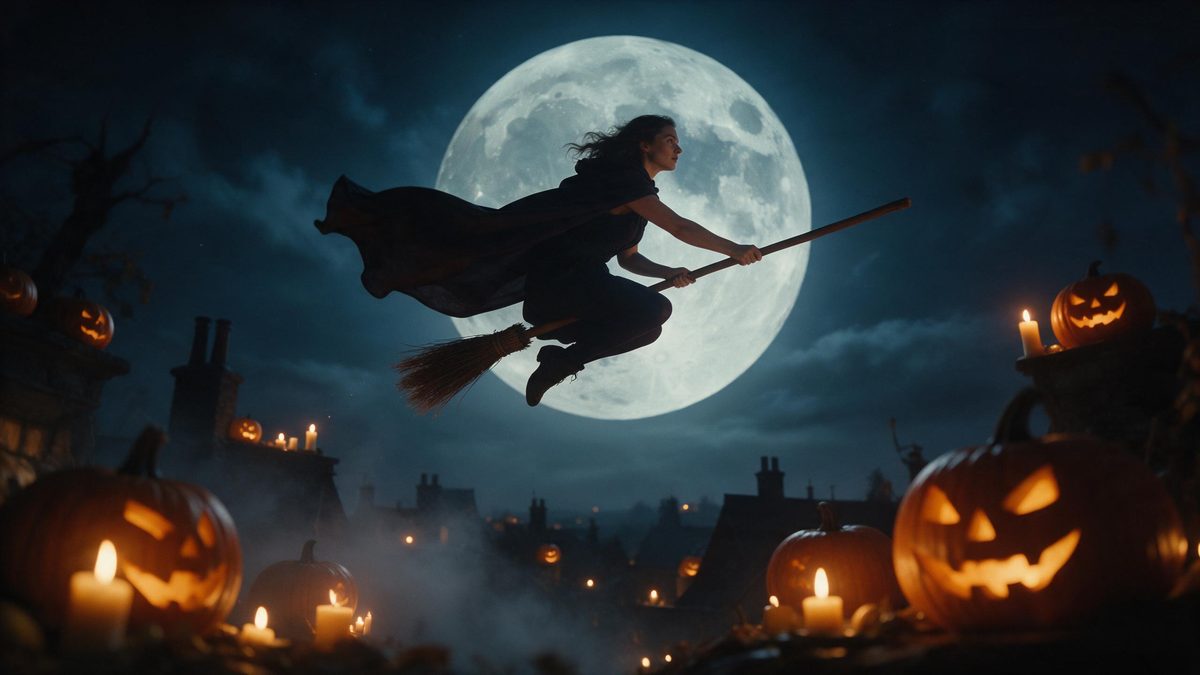
Flight is the shot that separates a costume from a production. Getting a person convincingly off the ground takes rigging, a safety conversation, a patient camera operator and an afternoon of cleanup to remove whatever held them up. None of that is available to someone making a clip for a group chat on a Thursday evening. Flying on a Broomstick takes the short route instead: one photograph in, five seconds of flight at 1080p out.
The template accepts a single photo containing one person, framed half-body or full-body at a medium or close distance, and it returns a clip that matches the proportions of that photo. Its one recorded weakness is scale: the subject can sometimes sit slightly out of proportion with the background behind them. A frame with some room around the person is the cheapest way to keep that from mattering.
Specs at a glance
Straight from the product panel, not from a marketing deck.
- Output
- 5-second video
- Credits
- 80 per run
- Resolution
- 1080p
- Aspect ratio
- Matches your input photo
- Input
- 1 photo — one person
- Best results with
- Half-body or full-body shots, framed medium or close
- Known limits
- Very occasionally the subject can look out of proportion against the background.
What it does
Built for this specific job, not a generic editor.
Off the ground, no rigging
The broomstick, the motion and the setting are all produced in the render. There is no harness to hide afterwards, no second take to organise, and nobody has to stand in a cold field holding a pole out of shot. One photograph is the whole input.
Five seconds, full HD
The output is a 5-second video at 1080p. That is enough time for the movement to register and short enough to loop, and full HD stays clean both on a phone and inside an embedded player. Nothing needs resizing afterwards.
One person per photo
The effect is specified for one photo with one person in it, framed half-body or full-body at medium or close range. A single clear subject is what the render builds the whole flight around. Two figures would leave it two sets of proportions to reconcile.
Your shape, kept
The aspect ratio follows your input photograph, so a tall phone shot exports tall and a wide one exports wide. You are not resizing a finished file to fit a platform after the render completes. Nothing gets cropped off the sides.
How it works
Four steps, no timeline to learn.
Find a full-body frame
Pick one photo of a single person, framed half-body or full-body at a medium or close distance. A shot with the whole figure visible gives the flight somewhere to go. Even light across the subject helps as well.
Upload the photo
Open the broomstick effect and add your image. There is nothing to rig or stage, because the movement, the broom and the background are generated together in a single render. Preparation amounts to choosing the file.
Check what it costs
Each run uses 80 credits, and the amount is displayed before you confirm. The Free plan supplies 30 credits a month with no card, so a paid tier is the realistic option for a series. Check the balance before starting.
Download and share
Save the 1080p clip and post it. Because the proportions match your source photo, a vertical shot arrives already shaped for stories and short-form feeds. Keep the file next to the original photograph.
Where people use it
The jobs this effect actually gets used for.
A clip for the children
A short flight clip sent to a family thread goes down better than another photograph of a costume on a hanger. Render it from a picture you already have and send it the same evening. Nobody has to sit still for it.
Posted before the 31st
Attention around Halloween builds through the month and drops off sharply afterwards. Post in the first half of October rather than on the day itself, when everything competes for the same few minutes. Early posts get forwarded.
Seasonal account runs
Business and community accounts can run a flight clip as one post in a short seasonal series. Keep the source photo constant across the run and it reads as deliberate rather than improvised. The look stays consistent.
Profile banners
A five-second clip in a profile header gives a page more life than a still image manages. At 1080p it stays sharp at banner size, and the file is small enough not to slow the page down. It loops quietly behind the text.
Why flight shots are worth generating
The difficulty was never the costume.
Ask anyone who has rigged a shot what the expensive part was, and it is never the broom. It is the afternoon: the harness, the retakes, the safety conversation, and the cleanup pass where whatever held the person up has to be removed frame by frame. For a clip intended to live for three days in a story, that cost is impossible to justify. Generating the flight removes the entire production layer. What remains is one photograph as the only input.
The reason a still is enough is that the render controls the whole scene. It is not dropping your subject onto stock footage of a sky; the figure, the broom, the movement and the light are produced together. That is why there is no edge where the subject meets the background. It is also why the input rule is strict about one person. Two subjects would mean two sets of proportions to reconcile inside one invented scene.
The limitation is narrow and worth stating plainly. The subject can sometimes sit slightly out of proportion with the background, and it shows most on photographs cropped tight against clutter. Choosing a source with open space around the person avoids it. Everything else about the output is fixed by the template: five seconds, 1080p, and a shape that mirrors whatever you uploaded. One photograph decides the result, and running it again gives you another take rather than the same file.
Credits and plans
Every effect draws on one shared credit balance.
Every render on the site draws from one credit balance. This effect costs 80 credits per run, and you see the figure on the confirmation step before spending anything. Free accounts get 30 credits monthly with no credit card; Starter is $9 for 400 credits, Pro is $19 for 1,000 and Studio is $59 for 4,000.
Related guides
Longer reads on the same workflow, from the OpenFilmo blog.
Image to Video AI: Animate Any Photo in Seconds
A complete guide to image to video AI: what makes a good source image, how to write motion prompts, top use cases, and how to fix …
Text to Video AI: Turn Any Prompt Into Video
Learn how text to video AI works, the four-part prompt formula that produces usable clips, how to fix common failures, and where i…
Character Consistency in AI Video: What Actually Works
How to keep characters consistent across AI video shots: reference images, prompt discipline, key frame locking and post-hoc corre…
Related effects
Same family of effects, on the same kind of input.
Frequently asked questions
What photo should I start from?
One image containing a single person, framed half-body or full-body at a medium or close distance. More of the figure in the frame gives the flight more to work with, and some open space around the subject helps too. Even light across the face is worth having.
What do I get at the end?
A 5-second video at 1080p showing the person from your photo on a broomstick. The aspect ratio mirrors the photo you uploaded, so a vertical source exports as a vertical clip. Nothing is trimmed off the sides at the end.
How many credits does it cost?
Eighty credits per run, displayed on the confirmation step before anything is spent. The Free plan includes 30 credits each month with no card attached, and the paid tiers increase the allowance considerably from there. Nothing is charged until you confirm.
Can two people ride together?
No. The template takes one photo with one person in it, framed half-body or full-body. If you need more than one figure in the frame, look at the Halloween effects that accept two people instead. Cropping a group shot down rarely works.
What is the known limitation?
The subject can sometimes sit slightly out of proportion with the background behind them. It is uncommon, and picking a photograph with open space around the person rather than a tight crop is usually enough. A plain background helps as well.