
Camera effect
Give a Pet the Fisheye Lens Treatment
Animals rarely hold still for a wide-angle shot taken at close range. Upload one full-body photograph of a single pet and the lens distortion is built into the render.
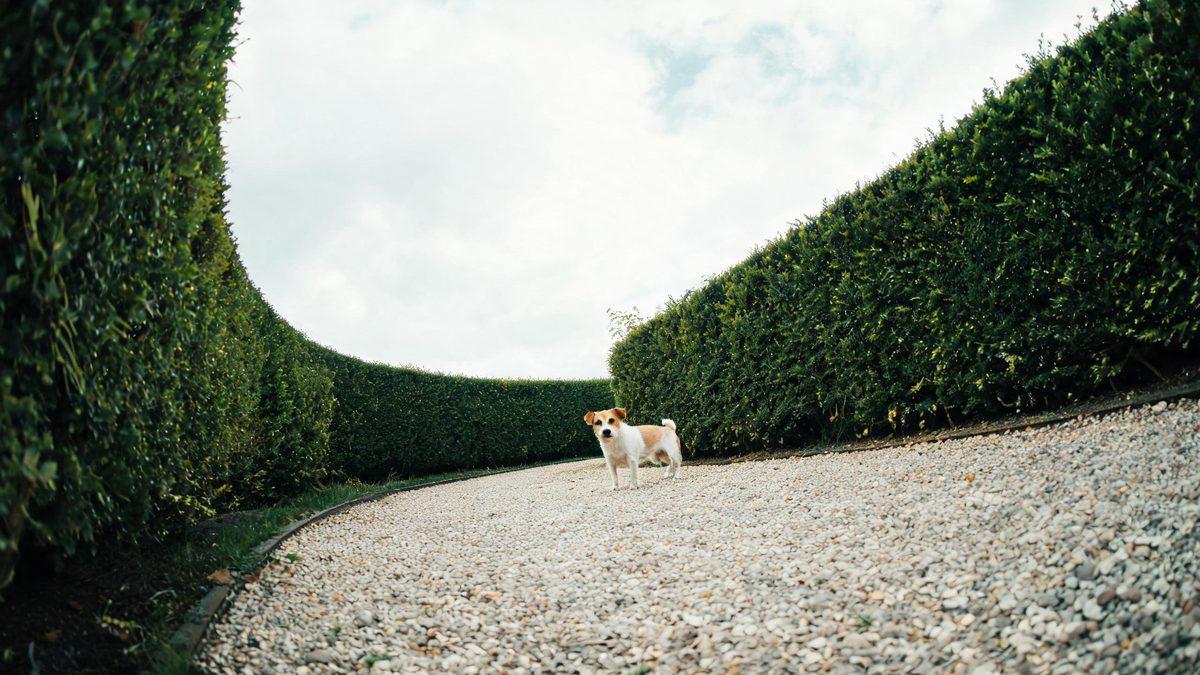
Photographing an animal with a fisheye lens means getting close, holding very still, and hoping the subject does not step back before the shutter closes. Most attempts end with a paw in the wrong place. Rendering the lens instead removes the attempt entirely: the photograph already exists, the animal in it is already standing where you wanted it, and the curved perspective is produced afterwards from that single frame.
One run costs 100 credits and produces a 4-second video at 720p in 9:16, fixed vertical. The input is one photograph of one pet, and a full-body shot of that animal is what the template works from. The documented limit is narrow and specific: occasionally the pet’s legs come out short. That is worth checking in the finished clip, particularly with breeds whose legs are a defining feature.
Specs at a glance
Straight from the product panel, not from a marketing deck.
- Output
- 4-second video
- Credits
- 100 per run
- Resolution
- 720p
- Aspect ratio
- 9:16
- Input
- 1 photo — one pet only
- Best results with
- A full-body shot of a single pet
- Known limits
- Occasionally the pet’s legs come out short.
What it does
Built for this specific job, not a generic editor.
One pet, no second attempt
A single animal in a full-body frame is the whole input. There is no need to get close with a lens or to wait for the animal to cooperate, because the photograph was taken at whatever distance worked.
Curved perspective, generated
The bowing is produced across the frame as the clip plays rather than stretched onto a still afterwards. Straight edges near the border curve, and the animal in the middle is pushed toward the viewer.
Vertical output, ready to post
The finished file is 9:16 at 720p, so it fills a phone screen completely. A tall composition is the output rather than a crop applied to something wider.
Short enough for a feed
At four seconds the clip is long enough for the lens behaviour to be understood and short enough to be watched to the end, which matters for a post built around one visual idea.
How it works
Four steps, no timeline to learn.
Find a full-body photograph
Choose an image with the whole animal visible, from nose to tail, and reasonably well lit. A tight crop of the face gives the lens nothing at the edges to bend.
Keep it to one animal
The template takes one pet only. A frame with two animals will not render as intended, so pick a photograph where the subject is alone in the picture.
Confirm the 100-credit run
The cost appears on the confirmation screen before you commit. It sits above the other camera effects here, so glance at the balance first and add credits if it is short of the figure shown.
Download and share
Save the 4-second 720p file and post it. It arrives in 9:16, so a story or a status frame takes it without any trimming on your side.
Where people use it
The jobs this effect actually gets used for.
A pet account opener
Animals with a following need motion that is not another walk clip. A fisheye render gives the account footage that looks deliberately shot rather than grabbed.
Adoption and rescue posts
A shelter photograph can be given movement and a lens character without a second visit to the animal. Four seconds is enough to hold attention in a feed.
Birthday and anniversary frames
A photograph taken on the day can be rendered as a short celebration clip, which lands better in a family thread than the still it came from.
A look test before a shoot
Rendering one frame is an inexpensive way to see whether the fisheye suits an animal before booking a photographer who owns the glass.
Why render the lens instead of buying it
Distance, patience, and one narrow quirk to check.
A fisheye on an animal is difficult for reasons that have nothing to do with the camera. The lens has to sit close to get the effect, which means the animal has to tolerate a photographer in its space, and most will step away or turn their head at the wrong moment. What usually results is a wide, empty room and a tail leaving the frame. A render inverts the order: the photograph is taken at whatever distance kept the animal comfortable, and the lens is applied later.
The output is fixed at 9:16 and four seconds, and both are worth planning for. A tall frame suits a phone completely, so the animal should be composed centrally rather than small in a wide shot that will be cut down. Four seconds is short, which means the interest has to be in the lens behaviour rather than in any action, so a static, well-framed animal works better here than one caught mid-movement.
The one documented limit is specific enough to check in seconds: occasionally the pet’s legs come out short. On a long-backed or short-legged breed this can be almost invisible, and on a leggy one it changes the silhouette noticeably. It is an artefact of the render rather than a fault in the photograph, and running the same image again can produce a different result. Only one pet can be in the upload, so a household with several animals needs one run each.
Credits and plans
Every effect draws on one shared credit balance.
Each fisheye pet render costs 100 credits, shown before you confirm, and it draws from the same balance as every other OpenFilmo effect. The Free plan includes 30 credits a month with no credit card required. Starter is $9 for 400 credits, Pro is $19 for 1,000 and Studio is $59 for 4,000.
Related guides
Longer reads on the same workflow, from the OpenFilmo blog.
Image to Video AI: Animate Any Photo in Seconds
A complete guide to image to video AI: what makes a good source image, how to write motion prompts, top use cases, and how to fix …
Text to Video AI: Turn Any Prompt Into Video
Learn how text to video AI works, the four-part prompt formula that produces usable clips, how to fix common failures, and where i…
AI Video Prompt Formulas That Hold Up in Production
Prompt structures that work for AI video: subject, motion, camera, time and style — with tested formulas, failure patterns and a m…
Related effects
Same family of effects, on the same kind of input.
Frequently asked questions
What does one render cost?
100 credits, shown on the confirmation screen before anything is spent. Free accounts receive 30 credits a month with no card, and paid plans raise the monthly allowance.
Can two pets be in one photograph?
No. The template takes one pet only, so a frame with two animals will not render as intended. Run them separately, or choose an effect in this collection that accepts more than one subject.
What should the photograph show?
A full-body shot of a single animal, reasonably well lit. The lens needs the whole silhouette to bend, so a tight crop of the face gives it far less to work with.
Why do the legs look short?
Legs coming out short is the documented limit of this effect. It is an artefact of the render rather than a problem with your photograph, and another run can differ.
How long is the finished clip?
Four seconds, at 720p in a fixed 9:16 vertical frame. It is ready for a story or a status post as it comes, with no cropping needed afterwards.