
Visual effect
Morph Two Photographs Into One Clip
Two photographs, one continuous change between them. Upload both to OpenFilmo and the morph is rendered as a 4-second 720p video for 40 credits.
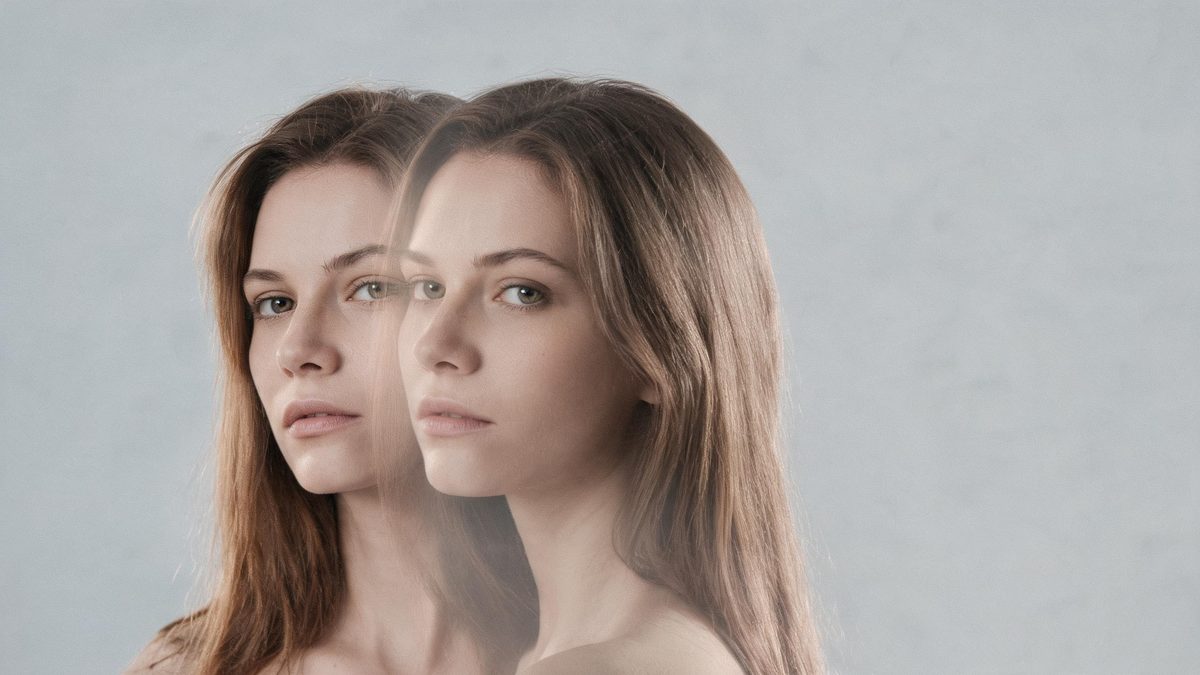
A morph is one of the oldest tricks in motion graphics and still one of the most effective, because it shows two states as one continuous object rather than cutting between them. Doing it properly means matching two frames, marking corresponding points, and rendering everything in between. This template takes the two photographs and produces that in-between itself, which is the part that normally takes the time.
You upload two photographs: the same person twice, or two different people. Each should hold one subject, which is what the effect asks for. One run costs 40 credits and returns a 4-second video at 720p in the aspect ratio of the photographs you supply. Four limits are documented, and they are worth knowing before spending anything: the middle of the transition can drop out, the first and last frames can meet awkwardly, the frame can break up, and the morph can come out strange.
Specs at a glance
Straight from the product panel, not from a marketing deck.
- Output
- 4-second video
- Credits
- 40 per run
- Resolution
- 720p
- Aspect ratio
- Matches your input photo
- Input
- 2 photos — the same person twice, or two different people
- Best results with
- One subject per photograph
- Known limits
- The middle of the transition can drop out, the first and last frames can meet awkwardly, the frame can break up, or the morph can come out strange.
What it does
Built for this specific job, not a generic editor.
Two photographs, one continuous change
The input is two images rather than one, which is unusual in this collection. The effect builds the passage between them instead of cutting, so the two states read as a single transforming subject.
The same person or two different people
Both arrangements are accepted: one person photographed twice, or two different people. That covers a before-and-after on one subject and a handover between two.
One subject per photograph
Keeping a single subject in each frame is what the template asks for, and it is the main thing you control. Extra people in either image give the morph more to reconcile than it can hold together.
Your shape, kept through the change
The output follows the aspect ratio of the photographs you upload, so the finished clip arrives in the shape you framed both sources for, with no crop added afterwards.
How it works
Four steps, no timeline to learn.
Choose the two photographs
Decide whether it is the same person twice or two different people, and pick one frame of each. Matching framing and lighting between the two gives the morph a cleaner path.
Check each frame holds one subject
One subject per photograph is the requirement. Crop or reshoot rather than uploading a group, since additional figures are a common cause of a broken result.
Upload both, then confirm at 40 credits
Add the two images and read the cost shown before you commit. Add credits if the balance is short, then begin the run. Nothing is deducted until you accept the price on that screen.
Watch the middle, then export
Play the finished 4-second clip through before posting it. The middle of the transition is where problems tend to show, and another run can come out differently.
Where people use it
The jobs this effect actually gets used for.
Before and after
One person photographed at two points becomes a single continuous change, which communicates a difference far more directly than two images placed side by side.
Two people, one handover
Two different subjects can be morphed into each other, which works as a reveal for a duet, a pairing, or a collaboration announcement.
Story transitions
The morph works as the link between two parts of a sequence, removing the cut that would otherwise sit between them.
Profile and header motion
A 4-second clip at 720p is small enough for an avatar slot or a page header, where the change plays quietly in the background.
Why two photographs change the job
The input is doubled, and so is the number of things that can go wrong.
Most effects in this collection ask for one photograph, and that single frame sets every condition: the subject, the framing, the lighting, and the shape of the output. A morph asks for two, which means every one of those conditions has to hold twice and also agree across the pair. Two photographs of the same person taken in different lighting, at different distances, or with the head at a different angle give the render two states it has to reconcile before it can build the passage between them.
That is why one subject per photograph matters so much here. The morph works by finding what corresponds between the two frames and moving it, and a second figure in either image adds correspondences it has to guess at. The documented failures cluster around exactly this: the middle of the transition can drop out, the frame can break up, and the morph can come out strange. Keeping both frames to a single, centrally placed subject removes most of that guesswork.
The join at either end is the other place to look. The first and last frames can meet awkwardly, which is noticeable when the clip is going to loop or when it sits between two other shots. Where the morph is the whole post, a slightly awkward start is easy to miss. Where it is a link inside something longer, watch it in context before committing. At 40 credits a second run is inexpensive, and results differ between attempts, so retrying the same pair is a reasonable first response to a bad middle.
Credits and plans
Every effect draws on one shared credit balance.
A morph run costs 40 credits for both photographs, and the price is shown before you confirm, so there is no ambiguity about the spend. Every OpenFilmo effect shares one credit balance. The Free plan includes 30 credits a month with no credit card required; Starter is $9 for 400, Pro is $19 for 1,000 and Studio is $59 for 4,000.
Related guides
Longer reads on the same workflow, from the OpenFilmo blog.
Image to Video AI: Animate Any Photo in Seconds
A complete guide to image to video AI: what makes a good source image, how to write motion prompts, top use cases, and how to fix …
Character Consistency in AI Video: What Actually Works
How to keep characters consistent across AI video shots: reference images, prompt discipline, key frame locking and post-hoc corre…
AI Video Prompt Formulas That Hold Up in Production
Prompt structures that work for AI video: subject, motion, camera, time and style — with tested formulas, failure patterns and a m…
Related effects
Same family of effects, on the same kind of input.
Frequently asked questions
How many photographs do I need?
Two. The same person photographed twice, or two different people, with one subject in each frame. A single photograph will not run, since there is nothing to morph between.
What do I get back?
A 4-second video at 720p in the aspect ratio of the photographs you upload. The change runs continuously across the clip rather than cutting from one image to the other.
Why does the middle fall apart?
A dropout in the middle is a documented limit of this effect, along with the frame breaking up. Using one subject per photograph, with similar framing in both, gives it a better chance, and another run can differ.
What does a morph cost?
40 credits per run, covering both photographs, and the figure appears before you confirm. Free accounts receive 30 credits each month without a card, and paid plans raise the monthly figure.
Can each photo hold more than one person?
It is not recommended. One subject per photograph is what the template asks for, and additional figures in either frame are a common cause of a strange or broken morph.