
Viral effect
Lift a Spirit Out of One Photo
A 4-second clip that floats a second self above the subject. One upload, 40 credits, 720p, and the headroom that makes it work.
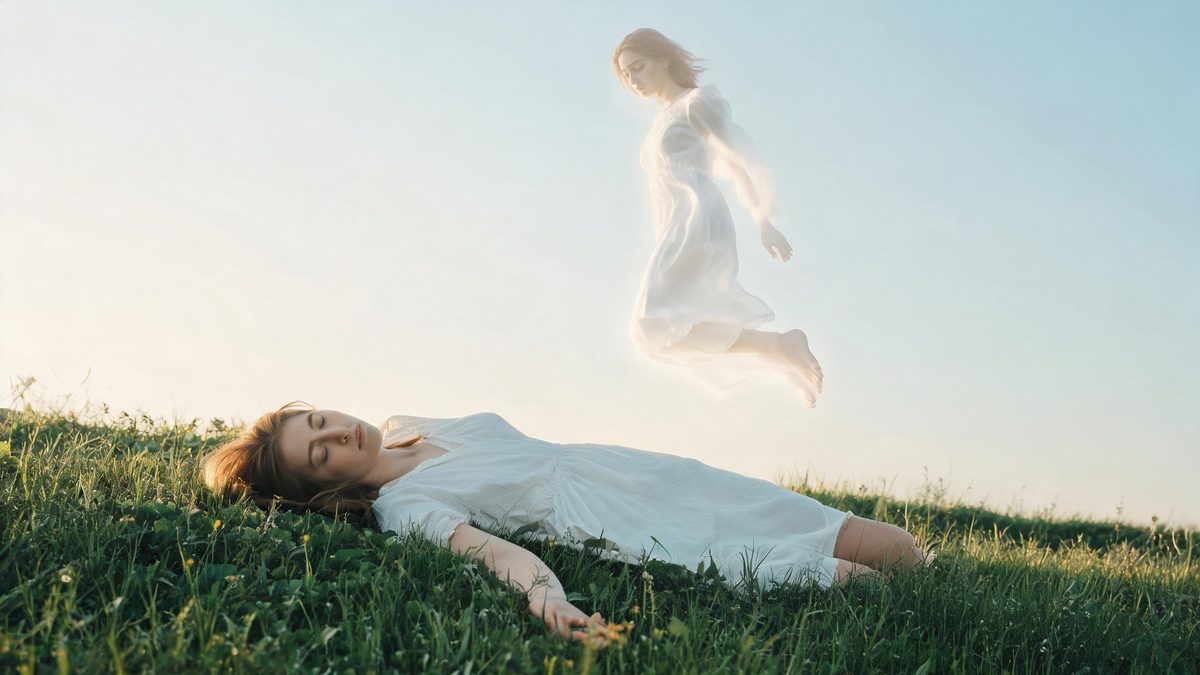
An out-of-body effect lifts a version of the subject clear of the frame and lets it float. The template takes one photograph and animates that separation, so the effect depends on having somewhere for the floating figure to go. That is the one piece of preparation it asks for, and it is entirely in the framing you upload.
The output is a 4-second 720p video at 40 credits per run, and the frame follows your source. It accepts one person, a pair, a group, a pet or an object in the same slot. The recommended input leaves open space above the subject, and the documented limits are that the figure can float for only a short time, or fail to detach at all.
Specs at a glance
Straight from the product panel, not from a marketing deck.
- Output
- 4-second video
- Credits
- 40 per run
- Resolution
- 720p
- Aspect ratio
- Matches your input photo
- Input
- 1 photo — one person, a pair, a group, a pet, or an object
- Best results with
- A frame with open space above the subject
- Known limits
- The floating figure can drift for only a short time, and sometimes it never separates from the subject at all.
What it does
Built for this specific job, not a generic editor.
Almost any subject
One person, a pair, a group, a pet or an object all fit the same upload slot. The effect is about separating a version of the subject, so it works whether the subject is a person or a thing.
Headroom matters
The recommended input leaves open space above the subject. That empty area is where the floating figure travels, so a photograph cropped tight to the top of the head works against the effect.
Source shape preserved
The clip keeps the aspect ratio of the photograph you upload. A vertical portrait stays vertical, which gives the floating figure a taller area to rise into.
A four-second reveal
The separation and the float both happen within the clip. Four seconds is long enough for the reveal to register and short enough to hold attention without a build-up.
How it works
Four steps, no timeline to learn.
Leave space above the subject
Choose one photograph in which there is open area above the head or body. That space is where the floating figure rises, so an image cropped tight at the top leaves the effect nowhere to go.
Frame the subject large enough
Keep the subject substantial in the frame so the separation reads. A tiny figure in a wide landscape gives the float less detail to work with when it detaches.
Run it and confirm the charge
Add the image to the out-of-body effect and check the confirmation panel. Each run uses 40 credits from the shared balance, and the amount appears before you confirm.
Check how far it rises
Play the 4-second 720p result and watch whether the figure fully separates and how long it stays aloft. Both are documented variables, and both are helped by having headroom in the source.
Where people use it
The jobs this effect actually gets used for.
Fantasy and horror content
The effect suits a supernatural story beat or a Halloween-style post. A portrait with space above it gives the floating figure a clear path to rise through.
Music and mood edits
The slow separation works as a visual under a moody audio track. Because the frame follows the source, a vertical image drops straight into a phone-first placement.
Concept and character work
A character can be shown in two states at once for a story or a concept board. Keeping the subject large in the frame makes both versions readable.
Object and product concepts
An object works on its own here, which lets the effect suggest a product lifting free of the frame. A simple background keeps attention on the separation rather than the setting.
Why headroom is the preparation this effect needs
The effect has to move something upward, so the frame has to contain somewhere for it to go.
Most effects on this site act inside the subject’s existing outline. This one creates a second version of the subject and moves it away, which means the frame has to hold both the original and the space above them. That is the entire reason for the headroom recommendation: a photograph with empty area above the subject gives the effect a region to animate into, while a tight crop leaves the floating figure nowhere to travel.
The two documented limits are both about that movement. The figure can float for only a short time, and sometimes it never separates at all. Neither is helped by re-running the same tight source, because the constraint is spatial rather than stochastic. Choosing a photograph with real space above the subject is the change that makes the difference, and it costs nothing to check before you upload.
The wide subject list is what makes the template adaptable. People, pairs, groups, pets and objects all work in the same slot, and the same advice applies to each: keep the subject large enough to read and leave air above it. A vertical portrait is especially well suited, because the tall frame naturally provides both the headroom and an easy placement in a story or short-form feed.
Credits and plans
Every effect draws on one shared credit balance.
Each out-of-body video uses 40 credits from the shared OpenFilmo balance, with the charge shown before confirmation. The Free plan includes 30 credits each month with no credit card required. Starter is $9 for 400 credits, Pro is $19 for 1,000, and Studio is $59 for 4,000.
Related guides
Longer reads on the same workflow, from the OpenFilmo blog.
Image to Video AI: Animate Any Photo in Seconds
A complete guide to image to video AI: what makes a good source image, how to write motion prompts, top use cases, and how to fix …
AI Video Prompt Formulas That Hold Up in Production
Prompt structures that work for AI video: subject, motion, camera, time and style — with tested formulas, failure patterns and a m…
Best AI Video Generators 2026: 15 Tools Tested
We tested 15 AI video generators on the same prompts and ranked them for 2026. Compare quality, speed, credit pricing and commerci…
Related effects
Same family of effects, on the same kind of input.
Frequently asked questions
What photo works best for an out-of-body video?
One photograph with open space above the subject, framed so the subject is large enough to read. That headroom is where the floating figure rises, so it is the single preparation this effect asks for.
How much does an out-of-body video cost?
A run costs 40 credits, and the amount is shown before you confirm. The single charge covers the complete four-second clip, with no second upload and no extra step to set up the separation.
Why did the figure not float for long?
A short float, or no detachment at all, is a documented limit of this effect. It is helped most by having real empty space above the subject in the source photograph rather than by re-running the same tight crop.
What resolution and length does it produce?
The output is a 4-second video at 720p, and its aspect ratio matches the photograph you uploaded. A vertical portrait gives the floating figure a taller area to rise into.
Does it work with objects and pets?
Yes. A single person, a pair, a group, a pet or an object all fit the same upload slot. Keep the subject large in the frame and leave space above it, and the separation will read more clearly.