
Viral effect
Shatter One Photo Like Glass
A 4-second clip that breaks the frame into glass shards. One upload, 40 credits, 720p, and the motion limit to plan around.
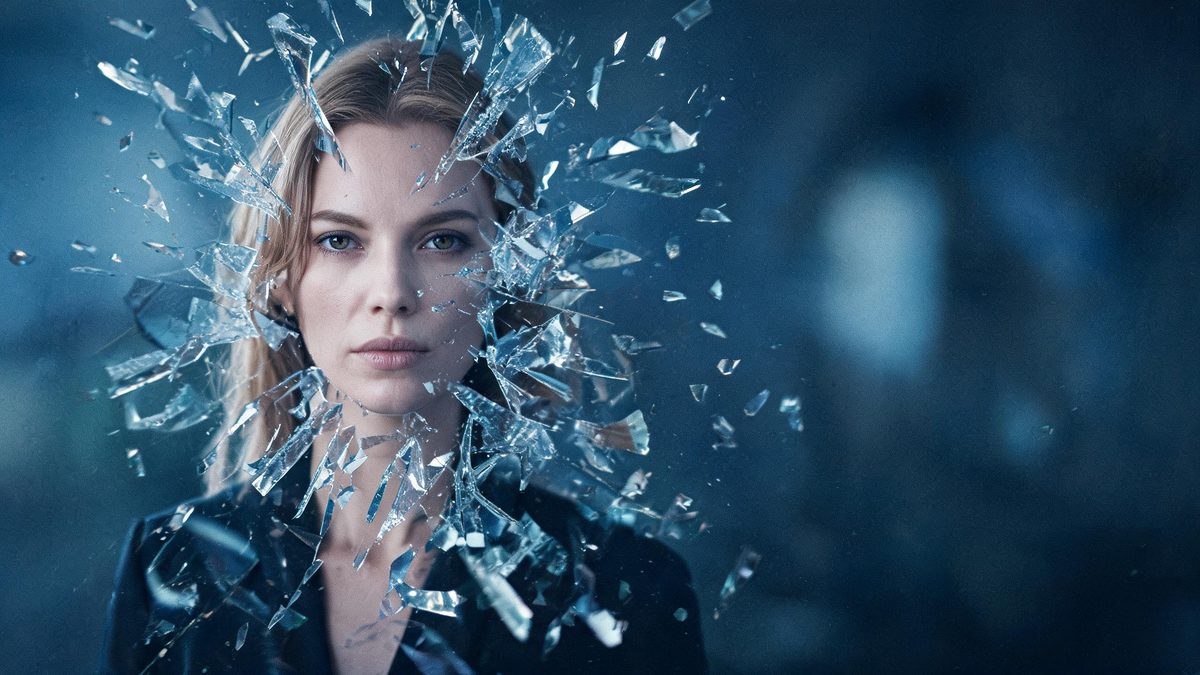
A shatter glass effect breaks the picture apart. The template takes a single photograph and animates it fracturing into pieces, so the impact lands on the frame itself rather than on the subject. It is a transition as much as an effect, and it suits a reveal or a cut point as readily as a standalone post.
The output is a 4-second 720p video at 40 credits per run, and the frame follows your source aspect ratio. It accepts one person, two people or a pet in the same upload slot, and the recommended input is a front-facing half-body or full-body frame of one person or one animal. The documented limit is honesty about physics: the shattering motion can look unnatural rather than physically convincing.
Specs at a glance
Straight from the product panel, not from a marketing deck.
- Output
- 4-second video
- Credits
- 40 per run
- Resolution
- 720p
- Aspect ratio
- Matches your input photo
- Input
- 1 photo — one person, two people, or a pet
- Best results with
- A front-facing half-body or full-body frame of one person or one animal
- Known limits
- The shattering motion can look unnatural rather than physically convincing.
What it does
Built for this specific job, not a generic editor.
The whole frame is the subject
Unlike the transformation effects, this one acts on the photograph itself. The break spreads across the composition, which makes it usable as a transition between two pieces of content rather than only as a standalone gag.
One person, two people or a pet
A single upload slot handles all three cases. That keeps the effect flexible across portrait, couple and pet content without a separate template for each.
Front-facing framing recommended
A front-facing half-body or full-body frame of one person or one animal is the recommended input. Keeping the subject clear and centred gives the break a definite structure to spread from.
Source shape preserved
The clip keeps the aspect ratio of the photograph you upload, so the fracture follows the shape of your frame. A vertical image cracks vertically and a wide image cracks across.
How it works
Four steps, no timeline to learn.
Choose a clean, front-facing frame
Pick one photograph of a person, a pair or a pet, framed at half body or full body and facing the camera. A clear subject against a simple background gives the break a readable surface.
Think about where it will cut
Treat the clip as a transition as well as an effect. Decide whether the break should open a sequence or close one, since that changes whether you want the source to be the first image or the last.
Run it and confirm the charge
Add the image to the shatter glass effect and check the panel before confirming. Each run costs 40 credits from the shared balance, and the figure is shown in advance.
Watch the motion, not just the break
Play the 4-second 720p result and judge the movement of the shards rather than only the final state. The realism of the motion is the part named as unreliable, so it is the section to review.
Where people use it
The jobs this effect actually gets used for.
Transitions between two shots
The effect works as a cut point in a longer edit, breaking one image apart to reveal the next. Choosing a source with a clear subject gives the transition a strong visual anchor.
Dramatic reveal posts
A portrait that breaks apart makes an attention-grabbing opener for a short-form post. A front-facing frame keeps the subject recognisable right up to the moment it fractures.
Product and object concepts
An object photograph can be presented as breaking into pieces for a dramatic teaser. A simple background keeps the focus on the shards rather than the surroundings.
Pet and character content
A pet photograph works on its own in this effect. A side-on or front-on view with the whole body visible gives the break a complete subject to work across.
Why the shattering motion is the part to judge
Breaking a photograph is easy to describe and hard to make physically believable.
A shatter effect is a physics problem disguised as a visual one. The result has to convince the viewer that a flat image has acquired depth, that the pieces have weight, and that they fall in a way gravity would allow. That is why the documented limit concerns the motion rather than the break itself: the frame does fracture, but the movement of the pieces can read as animated rather than physical on some sources.
The composition advice follows from where the eye goes. A clean front-facing frame of one person or one animal gives the fracture a strong central structure to propagate from, whereas a busy scene spreads the attention across many small elements and dilutes the impact. A subject that fills the frame and faces the camera keeps the viewer anchored on the subject right through the moment of the break.
Because the effect acts on the frame rather than the subject, it is genuinely useful as a transition. That is worth considering at the moment you choose the photograph, since a source intended to open a sequence has a different job from one intended to close it. Planning the cut first and the photograph second is a more reliable way to get a usable clip than running the effect and then deciding where it belongs.
Credits and plans
Every effect draws on one shared credit balance.
Each shatter glass video uses 40 credits from the shared OpenFilmo balance, with the charge shown before confirmation. The Free plan includes 30 credits each month with no credit card required. Starter is $9 for 400 credits, Pro is $19 for 1,000, and Studio is $59 for 4,000.
Related guides
Longer reads on the same workflow, from the OpenFilmo blog.
Image to Video AI: Animate Any Photo in Seconds
A complete guide to image to video AI: what makes a good source image, how to write motion prompts, top use cases, and how to fix …
AI Video Prompt Formulas That Hold Up in Production
Prompt structures that work for AI video: subject, motion, camera, time and style — with tested formulas, failure patterns and a m…
AI Video Upscaling to 4K: Refiners, Settings and Limits
How AI video upscaling and one-step refiners work, when to upscale versus regenerate at native resolution, and the settings that a…
Related effects
Same family of effects, on the same kind of input.
Frequently asked questions
What can I upload to the shatter glass effect?
One photograph containing a single person, two people or a pet, framed at half body or full body and facing the camera. A clear subject against a simple background gives the break a readable surface.
How much does a shatter glass video cost?
A run costs 40 credits, and the amount is shown before you confirm. The single charge covers the complete four-second clip, with no second upload and no extra step to set up the break.
Why does the shattering look unnatural?
The motion of the shards, rather than the break itself, is the part named as unreliable, and it can read as animated rather than physical. Reviewing the movement is more useful than judging only the final frame.
What resolution and length does it produce?
The output is a 4-second video at 720p, and its aspect ratio matches the photograph you uploaded. A vertical image fractures vertically and a wide image fractures across the frame.
Can I use it as a transition?
Yes. Because the effect acts on the whole frame rather than on the subject, it works well as a cut point in a longer edit. Deciding whether it opens or closes a sequence first makes the source choice easier.