
Viral effect
Send One Photo Running From a Beast
A 5-second vertical clip in which the person in your photo is chased by a giant animal. One upload, 80 credits, 1080p, and the scale rules.
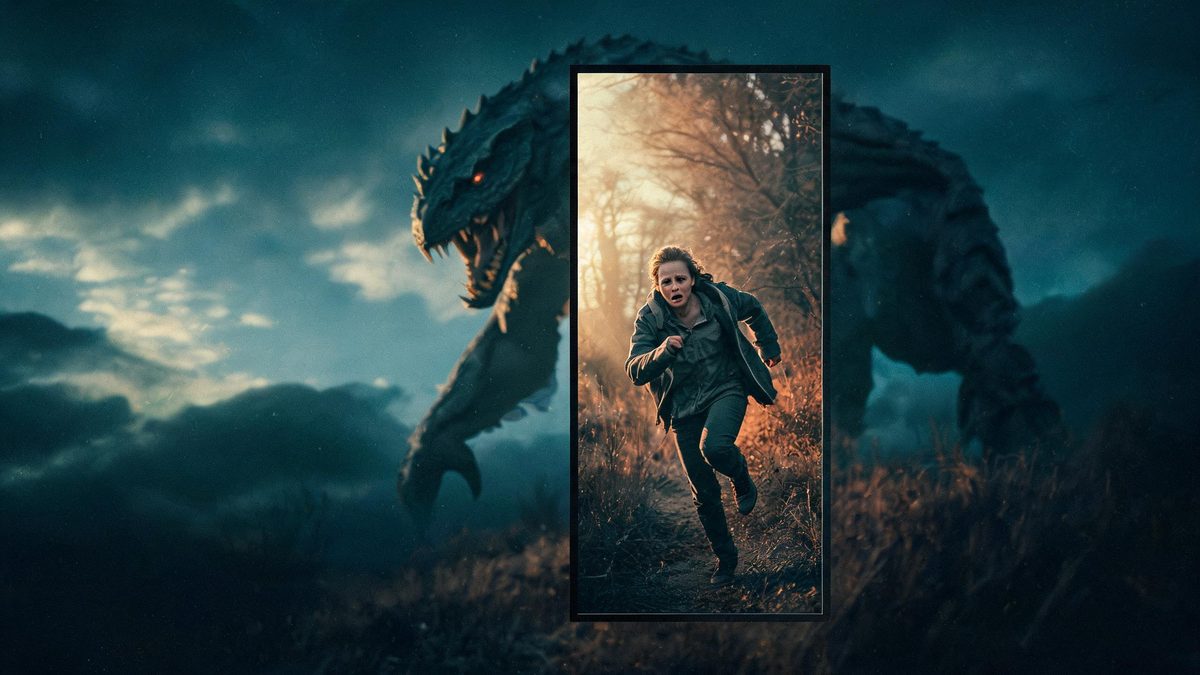
A beast chase effect puts a giant animal behind the subject and sets both of them running. The template takes one photograph of a single person and animates the pursuit, so the clip is built from the subject plus an environment the effect supplies. That makes it the most cinematic of this batch, and also the one with the most moving parts.
The output is a 5-second 1080p video in a fixed 9:16 frame at 80 credits per run. The recommended input is a full-body or half-body shot. Three documented limits concern the staging rather than the subject: the interaction with the surroundings can break physical logic or clip through objects, the running can slow down or stop so the scene loses tension, and the animal can be drawn too small and end up hidden behind the subject.
Specs at a glance
Straight from the product panel, not from a marketing deck.
- Output
- 5-second video
- Credits
- 80 per run
- Resolution
- 1080p
- Aspect ratio
- Fixed 9:16 vertical
- Input
- 1 photo — one person
- Best results with
- A full-body or half-body shot
- Known limits
- The interaction with the surroundings can break physical logic or clip through objects, the running can slow down or stop so the scene loses tension, and the animal can be drawn too small and end up hidden behind the subject.
What it does
Built for this specific job, not a generic editor.
Higher resolution than the rest
This effect delivers 1080p rather than 720p, and five seconds rather than four. The larger, longer frame suits the extra detail of a chase scene and gives the run more time to build.
A fixed vertical frame
The result is 9:16 by design rather than inherited from the photo. That vertical format is ready for a story or a short-form feed, and it suits the depth of a chase running away from the camera.
Full-body or half-body input
A shot showing the subject from about the waist up is the recommended input. A clear view of the running figure gives the effect the pose it needs to animate forward.
A scene, not an overlay
The effect builds an environment around the subject rather than adding a layer to the original. That is what produces the cinematic read, and it is also why the staging is the part to check.
How it works
Four steps, no timeline to learn.
Choose a clear full-body or half-body shot
Pick one photograph of a single person, framed from about the waist up. A clean, well-lit view of the figure gives the effect the pose it needs to set in motion.
Plan for the vertical frame
Because the result is fixed at 9:16, choose a source that keeps the subject centred and readable in a tall crop. Composition made for a wide frame will lose its edges in the vertical result.
Run it and confirm the cost
Add the photo to the beast chase effect and check the panel before confirming. Each run uses 80 credits from the shared balance, which is the highest of this batch, and the amount is shown in advance.
Check the staging, not just the subject
Play the 5-second 1080p clip and watch the scene around the subject: whether the interaction with objects makes physical sense, whether the running keeps its pace, and whether the animal stays large enough to see.
Where people use it
The jobs this effect actually gets used for.
Short-form action hooks
A chase is a strong opener for a short-form post because it creates tension in the first second. The 9:16 frame drops straight into a story or a vertical feed without reframing.
Horror and sci-fi themes
The effect suits a monster-movie premise or a Halloween-style clip. A clear half-body subject reads well against a large animal in a vertical composition.
Gaming and fandom content
A portrait can be staged inside a chase scene for a gaming or fandom post. Treat the result as a cinematic illustration rather than an event, since the environment is generated.
Trailer and teaser concepts
At five seconds and 1080p, the clip is substantial enough to sit in a teaser edit. Judge the pacing before using it, because the run needs to keep its speed to hold tension.
Why the animal can disappear behind the subject
This effect builds a scene, so there is more to go wrong than in a portrait transformation.
A beast chase is the most complicated effect in this batch because it stages an event rather than changing a subject. The effect supplies an environment, a second creature and a movement, then has to keep all three consistent with the person in the photograph. That is a great deal of generated content, and the documented limits all sit in the staging rather than in the subject itself: the interaction with objects can break physical logic or clip through them, the running can slow or stall, and the animal can be drawn at the wrong scale.
The scale limit is the one to plan around. If the animal is rendered too small, it can end up hidden behind the subject, and the premise of the clip disappears with it. That risk is partly a function of the source framing, since a subject who fills the frame leaves less room for a large creature behind them. Choosing a half-body shot rather than a tight portrait gives the effect space to place the animal where it can be seen.
The fixed 9:16 output shapes the rest. Because the frame is vertical and the result does not inherit your source shape, the effect is composing for a tall screen, and a subject who is centred and clearly lit survives that reframe best. Combined with the pacing caveat, the practical approach is to choose a clean, well-spaced source, run it once, and judge the scene as a whole rather than only the subject within it.
Credits and plans
Every effect draws on one shared credit balance.
Each beast chase video uses 80 credits from the shared OpenFilmo balance, with the charge shown before confirmation. The Free plan includes 30 credits each month with no credit card required. Starter is $9 for 400 credits, Pro is $19 for 1,000, and Studio is $59 for 4,000.
Related guides
Longer reads on the same workflow, from the OpenFilmo blog.
Image to Video AI: Animate Any Photo in Seconds
A complete guide to image to video AI: what makes a good source image, how to write motion prompts, top use cases, and how to fix …
AI Video Prompt Formulas That Hold Up in Production
Prompt structures that work for AI video: subject, motion, camera, time and style — with tested formulas, failure patterns and a m…
AI Video Generator for YouTube: Growth Workflow
How to use an AI video generator for YouTube: B-roll, Shorts, intros and thumbnails, a weekly workflow, plus monetisation and disc…
Related effects
Same family of effects, on the same kind of input.
Frequently asked questions
What photo should I upload for a beast chase?
One photograph of a single person, framed at full body or half body, with the subject centred and clearly lit. A shot from about the waist up leaves room for the animal to stay visible in the frame.
How much does a beast chase video cost?
A run costs 80 credits, shown before you confirm. That is the highest price of this batch and covers the complete five-second clip at 1080p, with no second upload required.
Why is the output vertical?
This effect delivers a fixed 9:16 frame rather than inheriting your source shape. The vertical format is ready for a story or short-form feed and suits a chase running away from the camera.
Why was the animal so small in my clip?
The animal being drawn too small to see is a documented limit, and it often ends up hidden behind the subject. Leaving space around the subject in the source gives the effect more room to place the creature.
What resolution and length does it produce?
The output is a 5-second video at 1080p in a fixed 9:16 frame. That is a higher resolution and a longer runtime than the other effects in this set, which suits a chase scene.