
Transformation effect
Grow Angel Wings From One Photo
A 4-second clip that gives the subject of your photograph a pair of wings. One upload, 40 credits, 720p, and an honest note on what else can change.
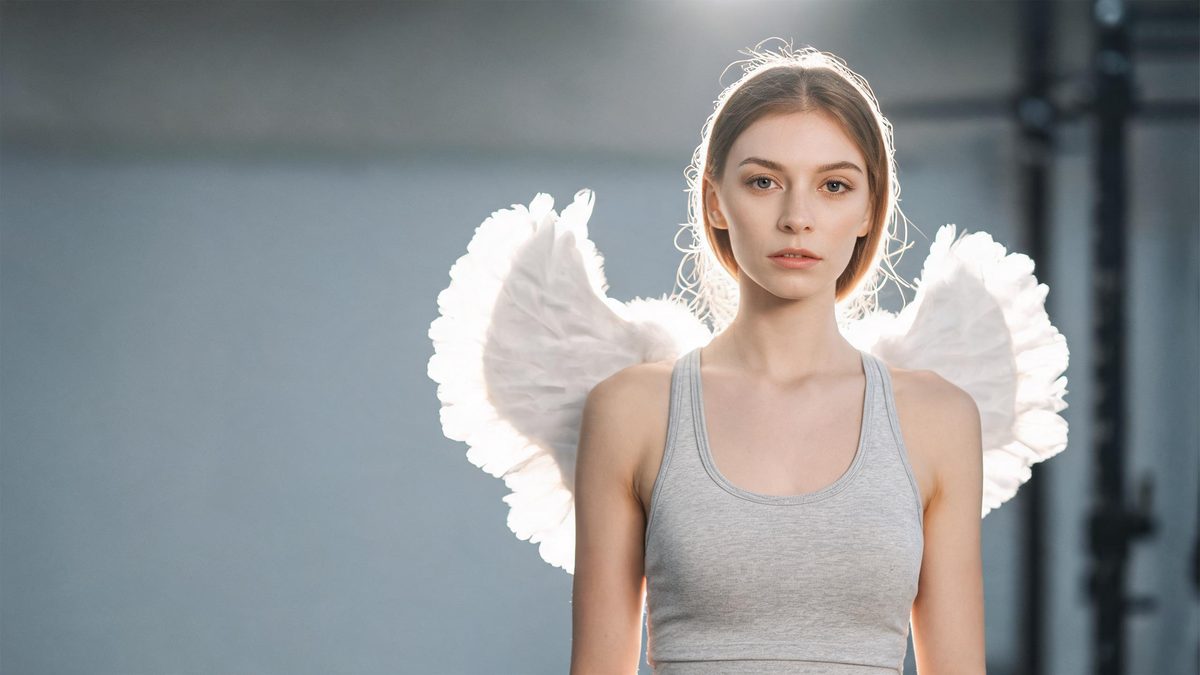
An angel wings effect is a small addition that changes the read of a photograph completely. The template takes one picture of a person or a pet and animates a pair of wings growing from the back, so an ordinary portrait can become a fantasy image without a costume, a shoot, or a second upload.
The output is a 4-second 720p video at 40 credits per run, and the frame follows your source photograph. The effect has a short, specific list of things that can move besides the wings: hands can vanish once the wings appear, clothing can change on its own, and the wing colour is not guaranteed to be the pure black or white you pictured.
Specs at a glance
Straight from the product panel, not from a marketing deck.
- Output
- 4-second video
- Credits
- 40 per run
- Resolution
- 720p
- Aspect ratio
- Matches your input photo
- Input
- 1 photo — one person or one pet
- Best results with
- A full-body or half-body frame
- Known limits
- Hands can disappear once the wings grow, clothing can change on its own, and the wings are not always the pure black or white you expect.
What it does
Built for this specific job, not a generic editor.
Wings that belong to the frame
The wings are generated into the existing photograph rather than pasted over it, so perspective, lighting and the subject pose all stay consistent. That is what lets a plain portrait pass as a fantasy shot rather than a composite.
People and pets in one slot
A single photograph of one person or one pet is all the effect needs. The same upload handles both, so a portrait and an animal picture are two runs of one tool rather than two separate workflows.
Full-body and half-body frames
The recommended inputs are frames that show either the whole figure or at least half of it. Both give the wings a clear upper back to attach to, and both keep the subject large enough for the growth to read.
Source shape preserved
The clip keeps the aspect ratio of the photograph you uploaded. A tall portrait remains tall and a wide frame remains wide, so the composition survives the effect without a reframing step.
How it works
Four steps, no timeline to learn.
Frame the whole figure or half of it
Choose one photo of a person or a pet where the frame shows the full body or at least the upper half. The wings attach at the back, so a shot where the torso is clear gives the effect the most to anchor to.
Check the hands before uploading
Look at whether the hands are visible and important to the composition. Hands can disappear once the wings grow, so if a gesture matters, pick a different photograph or reframe so the hands are not part of the message.
Run it and confirm the cost
Add the photo to the angel wings effect and review the confirmation panel. A run uses 40 credits from the shared balance, and the amount is shown before you commit.
Compare the result against the source
Play the 4-second 720p clip next to the original photograph and check three things: whether the hands are still present, whether the clothing has shifted, and what colour the wings came out. Those are the details named as variable.
Where people use it
The jobs this effect actually gets used for.
Fantasy and character portraits
A straightforward portrait becomes a character image for a story, a roleplay account, or a concept board. Keep the pose upright and the background uncluttered so the wings are the only new element that reads.
Memorial and tribute posts
A gentle frame with wings suits a tribute post where the tone is quiet rather than dramatic. A soft background and a still pose give the effect room without competing detail.
Pet fantasy content
An animal photograph works on its own here, which turns a pet portrait into a small fantasy moment. A side-on shot with the whole body visible gives the wings an obvious place to sit.
Seasonal and holiday themes
Angel imagery has a natural home around the winter holidays and in wedding-season content. Because the frame follows the source, a vertical portrait drops into a story placement without re-cutting.
Why the wings are not the only thing that can change
The honest version of this effect includes the parts of the frame it sometimes edits on its own.
Adding wings is a small edit in a large frame, and small edits are where generative effects are least predictable. The template does what it says, but it has a documented tendency to touch neighbouring areas: hands can vanish after the wings appear, clothing can shift without being asked to, and the wing colour can land somewhere other than pure black or white. Knowing that in advance changes how you choose a source, because you can avoid photographs where any of the three would matter.
The upside is that the surrounding scene is left alone. The background, the lighting and the face are not rebuilt, which is why the effect reads as the same photograph with wings added rather than as an illustration. For a tribute post, a character concept or a holiday image, that continuity is the whole appeal: viewers recognise the subject instantly, and the wings are the only new information on screen.
The input recommendation is deliberately broad. One person or one pet, framed at full body or half body, is all the effect asks for. Both extremes work because the wings attach at the upper back, an area that is visible in almost any upright frame. Where a source has the hands hidden behind the body or out of shot entirely, it removes the one detail most likely to go wrong, which is worth doing when you have a choice of photographs.
Credits and plans
Every effect draws on one shared credit balance.
Each angel wings video uses 40 credits from the shared OpenFilmo balance, with the charge shown before confirmation. The Free plan includes 30 credits each month with no credit card required. Starter is $9 for 400 credits, Pro is $19 for 1,000, and Studio is $59 for 4,000.
Related guides
Longer reads on the same workflow, from the OpenFilmo blog.
Image to Video AI: Animate Any Photo in Seconds
A complete guide to image to video AI: what makes a good source image, how to write motion prompts, top use cases, and how to fix …
Character Consistency in AI Video: What Actually Works
How to keep characters consistent across AI video shots: reference images, prompt discipline, key frame locking and post-hoc corre…
AI Video Prompt Formulas That Hold Up in Production
Prompt structures that work for AI video: subject, motion, camera, time and style — with tested formulas, failure patterns and a m…
Related effects
Same family of effects, on the same kind of input.
Frequently asked questions
What can I upload to the angel wings effect?
One photograph containing a single person or a single pet. Full-body and half-body frames are both recommended, since the wings attach at the upper back and need that area to be visible in the shot.
How much does an angel wings video cost?
A run costs 40 credits, and the amount appears before you confirm. The single charge covers the complete four-second clip in one pass, with no second upload required.
What resolution and length does it produce?
The output is a 4-second video at 720p. Its aspect ratio follows the photograph you uploaded, so a portrait stays vertical and a wide source stays wide without an extra cropping step.
Why did the hands disappear in my video?
Hands vanishing once the wings grow is one of the documented limits of this effect. If a gesture matters, choose a photograph where the hands are not central, or reframe so they sit outside the crop.
Can the wing colour be controlled?
Not reliably. The wings are not guaranteed to come out as the pure black or white you may expect. Treat the colour as part of the result rather than something to specify, and re-run if it lands somewhere you do not want.