
Product video effect
Helicopter Product Lift From One Pack Shot
Scale is the hardest thing to show in a tabletop photograph. Put the product under a helicopter and the size of the operation becomes the message instead of the size of the object.
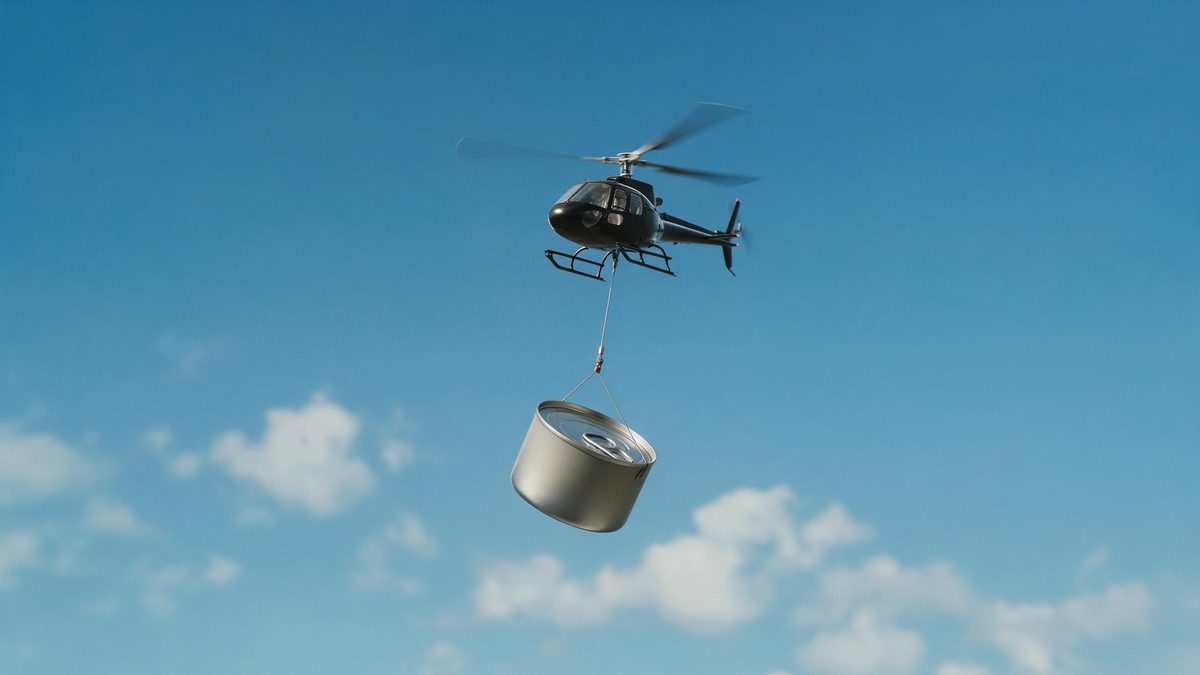
Small products photograph small. A jar, a tool or a boxed supplement shot on a tabletop reads at roughly the size it is, and no amount of styling changes that. An airlift shot inverts the problem: the object stays exactly the same size while everything around it gets enormous, and the viewer reads importance rather than dimensions. That is why this kind of footage turns up in launch creative for brands that have precisely one product to talk about.
The effect takes one front-facing product photo and builds the aircraft, the rig and the sky around it. Output is a 5-second 720p clip for 45 credits, in 9:16, 16:9, 4:3, 3:4 or 1:1. The cable and the helicopter are generated together with the shot, so occasionally the item clips through the aircraft or floats free of it instead of hanging, which is the thing to check before you publish.
Specs at a glance
Straight from the product panel, not from a marketing deck.
- Output
- 5-second video
- Credits
- 45 per run
- Resolution
- 720p
- Aspect ratio
- Your choice of 9:16, 16:9, 4:3, 3:4 or 1:1
- Input
- 1 photo — a single product
- Best results with
- A clear, front-facing product photo works best.
- Known limits
- Occasionally the product clips through the helicopter, or floats instead of hanging from it.
What it does
Built for this specific job, not a generic editor.
Scale without a location
The aircraft, the sky and the rigging are produced in the render. You get an expensive-looking establishing shot from a tabletop photograph without a location fee, a permit or a crew on the day. Nothing about the product itself has to change to make the shot work.
One object, one render
A single clear, front-facing product photo is all the template asks for. No reference plates, no second angle and no stock footage to licence before the shot can be made. Whatever is already sitting in your asset folder is enough to begin.
Five output shapes
Pick 9:16, 16:9, 4:3, 3:4 or 1:1 before rendering. Vertical suits Reels, Stories and Shorts, while 16:9 fits a listing video, an email header or a player embedded in a page. That frame is composed for the shape rather than trimmed into it later.
Five seconds, made to loop
The lift completes inside five seconds and restarts before a viewer scrolls past. On a feed that autoplays, the clip plays again without anybody deciding to watch it a second time. That repetition is where most of the watch time on a looping clip comes from.
How it works
Four steps, no timeline to learn.
Select a single product
Choose one front-facing pack shot, evenly lit, with the item fully inside the frame. Skip group photographs and lifestyle images, because the template needs to isolate one object. Keep the object isolated, since the template lifts one item and ignores the rest.
Open Helicopter Product Lift
Find the template in the OpenFilmo effect library and upload that image. The aircraft, the cable and the environment are generated, so there is nothing else to prepare first. Give the render a moment to finish, then watch the result before placing it.
Set the frame
Choose 9:16 for vertical placements, 16:9 for a listing video or a page embed, or 4:3, 3:4 or 1:1 for a catalogue tile or a feed post. Choose before the render runs.
Check the rigging
Run the render for 45 credits and watch how the product meets the cable. If it clips through the aircraft or floats rather than hanging, run it again before you use the clip.
Where people use it
The jobs this effect actually gets used for.
Launch creative
A single-product brand announcing something new needs a shot that reads as an event. An airlift does that in five seconds and costs one photograph rather than a production day.
Vertical ad openers
A 9:16 render opens a Reel with motion and scale already in the frame, which is what the first second of a vertical ad has to do if it is going to be watched at all.
Trade show and booth loops
Export 16:9 and run it on a screen at a booth or in a shop window, where a looping clip works harder than a printed banner that nobody looks at twice.
Email and landing headers
Movement at the top of a landing page keeps a visitor reading further down. A five-second airlift at 16:9 fits that slot without loading a heavy file. It also gives the page an establishing image it would not otherwise have.

Why an airlift shot sells a small object
Implied scale, and the two ways the rig can fail.
The trick this shot plays is on the sense of proportion rather than on the product. Nothing about the object changes; the frame around it becomes vast, and the viewer infers that something this difficult to move must matter. For categories where the product is genuinely small and the differentiation is in the formula rather than the form, supplements, serums, coffee, small electronics, that inference is doing most of the work that a feature list would otherwise have to do.
It also solves a production problem that independent brands hit constantly. Any shot involving aircraft, weather or a large exterior location is expensive and slow to arrange, and it has to be licensed if you buy it as stock. Generating the same idea from a pack shot means the concept can be tried at all, at 45 credits and 720p, and dropped quietly if it does not land, without anyone having committed a budget to it.
Where it goes wrong is the connection between the object and the aircraft. Occasionally the product clips through the helicopter, and sometimes it floats in the frame instead of hanging from the cable. Both are obvious once you watch the clip, and both are worth a second run rather than a compromise. A clean front-facing photograph with the object fully in frame and nothing overlapping it gives the rigging the best chance of resolving correctly.
Credits and plans
Every effect draws on one shared credit balance.
Helicopter Product Lift uses 45 credits per render, and a Free account receives 30 credits a month, so this effect cannot be run on Free at all. Starter is $9 a month for 400 credits, which is around eight runs of this shot, while Pro at $19 for 1,000 and Studio at $59 for 4,000 suit a brand testing several concepts a week. The cost is shown before you confirm.
Related guides
Longer reads on the same workflow, from the OpenFilmo blog.
AI Product Video for Ecommerce: What Converts
How to make AI product video that converts: shot types ranked by impact, consistency requirements, and the workflow for generating…
AI UGC Video Generator: Creator Ads at Scale
How to use an AI UGC video generator for creator-style ads at scale: hook formulas, script structure, a testing framework and disc…
Runway Ads: Autonomous Ad Generation, and What to Verify
Runway Ads claims 1,000% more ad volume at 2x ROAS. What autonomous ad generation does, which claims to trust, and how to test it …
Related effects
Same family of effects, on the same kind of input.
Frequently asked questions
What should the input photo show?
One product, photographed front-on and evenly lit, with the whole item visible and nothing overlapping it. A clear, front-facing product photo works best. Avoid a lifestyle shot with several objects, because the template lifts one item and ignores the rest.
Which aspect ratios are available?
9:16, 16:9, 4:3, 3:4 and 1:1. Use 9:16 for Reels, Stories and Shorts, 16:9 for listing videos, page embeds and email headers, and 1:1 or 4:3 where a feed post or a catalogue tile expects a squarer frame. Decide before the render runs, because the composition follows your choice.
What is the output?
A 5-second 720p video from a single product photo, with the helicopter, the cable and the surroundings generated in the same render. Nothing has to be composited afterwards, and the file downloads ready to place. Nothing needs compositing afterwards, so the file is ready when it lands.
Is it available on the Free plan?
Not practically. The effect costs 45 credits per run and Free includes 30 credits per month, so one render exceeds the monthly allowance. Starter at $9 a month for 400 credits is the entry point, at roughly eight renders. All of the effects share that one monthly balance.
What should I check before publishing?
Watch how the product sits against the helicopter. Occasionally it clips through the aircraft, and sometimes it floats in the frame rather than hanging from the cable. Either is visible in the finished clip, so run the effect again if it appears.