
Christmas effect
Put Christmas Lights on Any Building
Decorating a facade takes scaffolding, a budget and a permit. Upload one clear photograph of the building instead, and the lights, the garlands and the hat are rendered onto it.
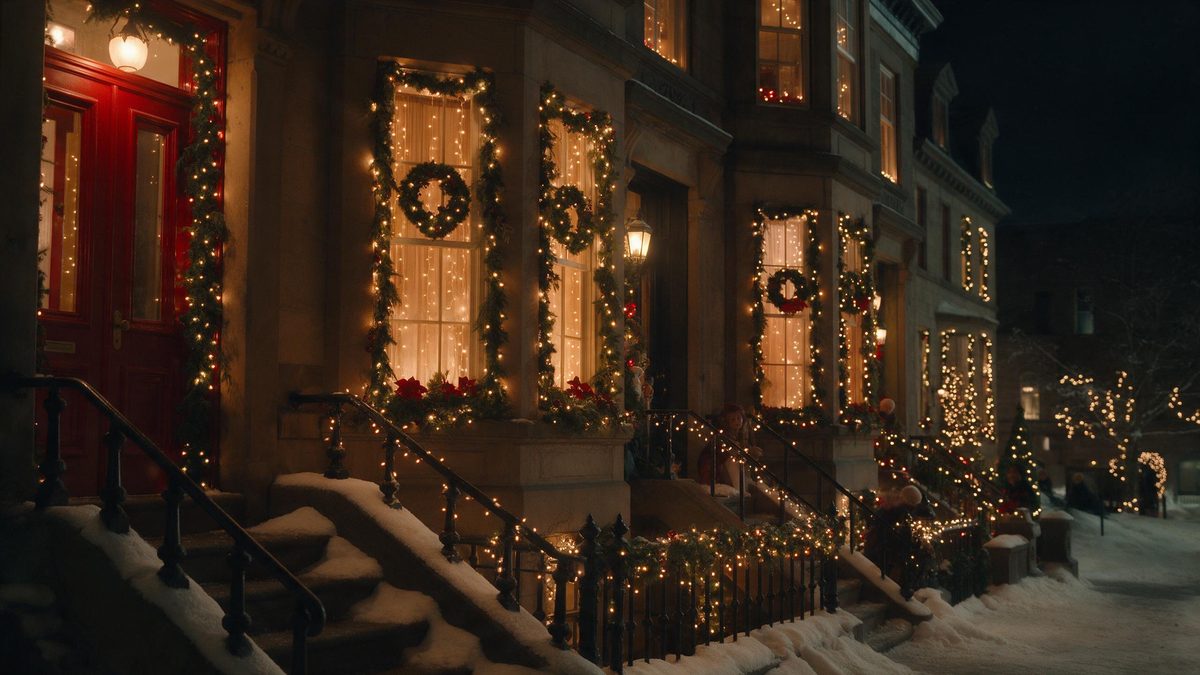
Decorating a real building is a project. It involves access equipment, a budget line, an electrical supply and, on anything listed or leased, a conversation with somebody who can say no. For most of the year that effort buys three weeks of visibility. A rendered version asks for one photograph and returns a dressed facade, which is a considerably smaller commitment for the same seasonal effect.
The output is a 5-second video at 720p for 40 credits, in the same aspect ratio as the image you supply. The input is a photograph of a building rather than of a person, and a clear shot gives the effect more to work with than a hazy or distant one. Two limits are documented: extra structures can appear in the frame, and buildings can poke through the Santa hat.
Specs at a glance
Straight from the product panel, not from a marketing deck.
- Output
- 5-second video
- Credits
- 40 per run
- Resolution
- 720p
- Aspect ratio
- Matches your input photo
- Input
- 1 photo — a building
- Best results with
- A clear photograph of the building
- Known limits
- Extra structures can appear, and buildings can poke through the Santa hat.
What it does
Built for this specific job, not a generic editor.
Built for buildings, not people
This template takes a photograph of a building and dresses it. There is no subject to pose, no costume to fit and no lighting to arrange on the day, because the facade was photographed long before the season started.
Decorations without the scaffolding
Lights, garlands and the Santa hat are produced inside the render. Nothing is installed, nothing is taken down in January, and no electrical supply has to be found for a display that lasts three weeks.
Five seconds at 720p
The finished clip runs five seconds at 720p, which is a step up from the shorter 360p templates in this collection. It holds up better on a monitor and suits a feed post or an embedded player.
Shape follows the photograph
The result keeps the aspect ratio of the image you upload, so a vertical phone shot of a shopfront returns a vertical clip, and a wide architectural frame stays wide with nothing cropped away from the edges.
How it works
Four steps, no timeline to learn.
Photograph the building clearly
Take or choose a sharp photograph with the whole facade visible and in focus. A hazy, distant or heavily shadowed image gives the effect less to read, and the decorations have nothing solid to attach to.
Upload that one image
Add it to the Christmas decorated building template. A single photograph is the entire input, so there is no prompt to write, no reference to source and no separate plate to prepare beforehand.
Confirm at 40 credits
The cost is displayed before you confirm. Check the balance, add credits if it is short, then start the run. Nothing is deducted until you agree to the figure shown on that screen.
Download and place it
Save the 5-second file and use it wherever the building needs to look seasonal: a listing, a social post, a reception screen. The shape matches your photograph, so no trimming is needed afterwards.
Where people use it
The jobs this effect actually gets used for.
Shopfront and hospitality posts
A café, a shop or a hotel can post a dressed facade without hanging a single light. It gives the account seasonal imagery for December using a photograph of the premises that already exists.
Property and letting listings
A listing gains a seasonal version of the exterior shot without a second visit to the property. Five seconds is enough for a viewer to register the building before the details carry the rest.
Local community pages
A high street group or a residents’ page can render several buildings from existing photographs and post them as a set. Each one costs 40 credits, so a short series stays affordable.
Reception and in-store screens
A 720p clip is comfortable on a small display in a lobby or a window. Loop it through December alongside whatever else is playing, and it reads as deliberate seasonal dressing.

Why dressing a photograph beats dressing a building
Access equipment is the real cost.
The cost of decorating a real building is almost never the decorations. It is the access: scaffolding or a cherry picker, an electrician, an insurance check, and for a leased property a landlord who has to agree to fixings in the brickwork. Against that, a photograph of the same building, rendered with lights on it, costs 40 credits and takes one upload. It will not be seen from the street, but for a post, a listing or a screen, being seen from the street was never the point.
The input matters more here than on the people templates, because the effect has to read architecture rather than a face. A clear photograph of the building is what the notes ask for, and it is worth taking the time to find one that is sharp, well exposed, and framed so the facade fills a useful part of the picture. A distant shot where the building is one small element among many gives the render very little to attach decorations to, and the result tends to look applied rather than built.
Two limits are documented, and both are visible in the finished clip. Extra structures can appear, so a building that stood alone in the photograph may come back with neighbours it never had. And buildings can poke through the Santa hat, which is a scaling issue rather than a decoration one. Neither is fatal for a social post, but both are worth checking before the file goes into a property listing, where an invented extension next door is a more serious problem.
Credits and plans
Every effect draws on one shared credit balance.
Forty credits covers one run of this effect, and the number is shown before you confirm so there is no ambiguity. All OpenFilmo effects share one credit balance. The Free plan provides 30 credits a month without a credit card; Starter is $9 for 400 credits, Pro is $19 for 1,000 and Studio is $59 for 4,000.
Related guides
Longer reads on the same workflow, from the OpenFilmo blog.
How to Use Vidu: A Practical Guide
How to use Vidu: reference-to-video workflow, keeping subjects consistent across shots, prompt approach, and where it fits compare…
Image to Video AI: Animate Any Photo in Seconds
A complete guide to image to video AI: what makes a good source image, how to write motion prompts, top use cases, and how to fix …
AI Video Upscaling to 4K: Refiners, Settings and Limits
How AI video upscaling and one-step refiners work, when to upscale versus regenerate at native resolution, and the settings that a…
Related effects
Same family of effects, on the same kind of input.
Frequently asked questions
What does this template take as input?
One photograph of a building. It is not a people effect, so a portrait will not give you the intended result. A clear, sharp shot with the facade well framed is what the notes recommend, since distance and haze both work against it.
How long and how sharp is the output?
A 5-second video at 720p, which is a step above the 360p templates elsewhere in this collection. It keeps the aspect ratio of the photograph you upload, so you get back the shape you started from and no crop is applied.
Why did extra buildings appear?
Extra structures appearing is a known limit of this template, because the render can add forms that were not in your photograph. For a social post this is usually harmless, but for a listing, check the frame carefully before using it.
What does buildings poking through the hat mean?
It is a documented scaling limit: parts of the building can show through the Santa hat placed on top of it. It is a visual artefact of the render rather than a problem with your photograph, and another run can differ.
What does one render cost?
40 credits, shown before you confirm, and one render dresses one building. Free accounts get 30 credits a month with no credit card required, and paid plans raise the allowance: Starter is $9 for 400, Pro $19 for 1,000 and Studio $59 for 4,000.