
Couple effect
Turn a Couple Photo Into a Wedding Video
A 4-second vertical clip that dresses two people in wedding attire from one photograph. One upload, 60 credits, fixed 9:16, and the framing rule.
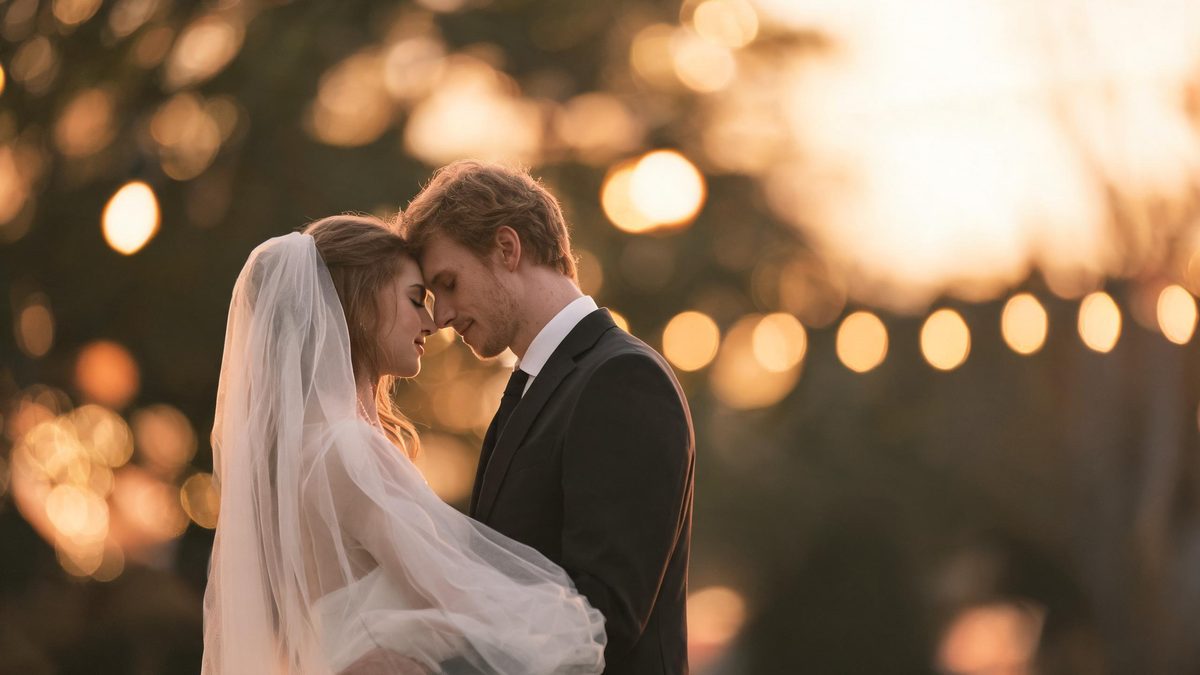
A dream wedding effect takes a photograph of two people and animates them into wedding attire. It is a framing exercise as much as a transformation: the effect works from a single two-person image, and the frame it produces is vertical by design rather than inherited from the source.
The output is a 4-second 720p video in a fixed 9:16 frame at 60 credits per run. The recommended input is a front-facing head-and-shoulders shot with no hair accessories, since the effect needs both faces close together and unobstructed. The one documented limit is clothing: when the outfits in the source photograph are very revealing, the wedding attire can fail to appear.
Specs at a glance
Straight from the product panel, not from a marketing deck.
- Output
- 4-second video
- Credits
- 60 per run
- Resolution
- 720p
- Aspect ratio
- Fixed 9:16 vertical
- Input
- 1 photo — two people
- Best results with
- A front-facing head-and-shoulders frame, with no hair accessories
- Known limits
- Wedding attire can fail to appear when the clothing in the source photo is very revealing.
What it does
Built for this specific job, not a generic editor.
Two people from one photograph
The upload slot takes a single image containing two people. There is no pairing of separate portraits and no matching step, so a joint photo already in your library is all the input the effect needs.
A fixed vertical frame
The result is 9:16 rather than the shape of the source. That vertical format is ready for a story, a short-form feed or a full-screen phone display without any reframing after the run.
Close, front-facing framing
A head-and-shoulders shot of both people facing the camera is the recommended input. Keeping the faces large and unblocked gives the effect the clearest signal for the attire change.
Four seconds, ready to place
At 720p and four seconds, the clip is light enough to drop into a highlight or a card without a conversion step, and long enough for the attire change to be read.
How it works
Four steps, no timeline to learn.
Choose a two-person head shot
Pick one photograph containing both people, framed at head and shoulders. Both faces should be clearly visible and turned toward the camera, since that is where the effect reads the most information.
Remove hair accessories where possible
The recommended input has no hair accessories. A hat, a headband or a large clip around the head reduces the clarity the effect needs, so a simpler source is the safer choice when you have several photographs.
Check the outfits before uploading
Look at how revealing the clothing in the source is. Very revealing outfits are the specific case in which the wedding attire can fail to appear, so a source with more coverage avoids the documented limit.
Run it and review the vertical result
Add the photo to the dream wedding effect, confirm the 60-credit charge, and play the 4-second 9:16 clip. Watch whether the attire appears on both people and whether the vertical crop kept both faces in frame.
Where people use it
The jobs this effect actually gets used for.
Engagement and save-the-date content
A casual couple photo becomes a formal wedding-styled clip for an announcement. The vertical frame suits an invite graphic or a story post without a re-crop.
Anniversary and vow-renewal posts
A long-married couple can use a recent photograph to produce a wedding-styled moment. A close, front-facing source keeps both faces readable through the attire change.
Playful couple and friendship content
The effect works as a light-hearted prompt for a couple or two friends. Because the framing is fixed and vertical, the clip drops straight into a phone-first placement.
Wedding-adjacent business posts
A planner or a venue can use the effect for a concept post that shows a stylised wedding look. Treat it as an illustration of a style rather than a photograph of an actual event.
Why the frame is vertical and the faces must be close
This is the one couple effect with a fixed output shape, and that shapes the input advice.
Most effects on this site inherit the aspect ratio of the photograph you upload. This one does not: it delivers a fixed 9:16 frame. That single fact reorders the priorities, because the effect is composing for a tall screen rather than preserving your source composition. A close crop of two faces is exactly the kind of subject that survives a vertical reframe, whereas a wide scene with two small figures would lose detail in the conversion.
The recommendation to use a head-and-shoulders shot follows from how much the effect has to change. Wedding attire touches the shoulders, the neckline and the hair, all of which sit in the upper part of the frame. Keeping both faces large and unblocked, and keeping hair accessories out of the shot, gives the effect the clearest signal in exactly the region it is rewriting. A busier source dilutes that signal and makes the outcome less predictable.
The clothing limit is the one to plan around deliberately. Very revealing outfits can prevent the wedding attire from appearing, which is a content-appropriateness rule built into the effect rather than a technical fault. Choosing a source photograph with more coverage removes the risk entirely and is a decision you can make before spending a run, which is why it belongs next to the framing advice rather than in a footnote.
Credits and plans
Every effect draws on one shared credit balance.
Each dream wedding video uses 60 credits from the shared OpenFilmo balance, with the charge shown before confirmation. The Free plan includes 30 credits each month with no credit card required. Starter is $9 for 400 credits, Pro is $19 for 1,000, and Studio is $59 for 4,000.
Related guides
Longer reads on the same workflow, from the OpenFilmo blog.
Image to Video AI: Animate Any Photo in Seconds
A complete guide to image to video AI: what makes a good source image, how to write motion prompts, top use cases, and how to fix …
Character Consistency in AI Video: What Actually Works
How to keep characters consistent across AI video shots: reference images, prompt discipline, key frame locking and post-hoc corre…
AI Video Generator for YouTube: Growth Workflow
How to use an AI video generator for YouTube: B-roll, Shorts, intros and thumbnails, a weekly workflow, plus monetisation and disc…
Related effects
Same family of effects, on the same kind of input.
Frequently asked questions
What photo should I upload for a wedding video?
One photograph containing two people, framed at head and shoulders with both faces facing the camera. The recommended input has no hair accessories, since a clear view of both faces gives the effect the most to work with.
How much does a wedding video cost?
A run costs 60 credits, and the amount is shown before you confirm. The single charge covers the complete four-second clip, with no second photo and no separate step to select the wedding look.
Why is the output vertical?
The dream wedding effect delivers a fixed 9:16 frame rather than inheriting your source shape. That format is ready for a story, a short-form feed or a full-screen phone display without any reframing after the run.
Why did the wedding dress not appear?
When the clothing in the source photograph is very revealing, the wedding attire can fail to appear. That is a documented behaviour rather than a technical fault, and choosing a source with more coverage avoids it.
What resolution and length does it produce?
The result is a 4-second video at 720p in a fixed 9:16 vertical frame. Both figures need to be close together in the source so they survive the vertical crop without one being cut out.