
Couple effect
Turn One Photo Into a Kiss Video
A 4-second clip that adds a partner and a kiss to a single-person photo. One upload, 60 credits, 720p, and a straight account of the face limits.
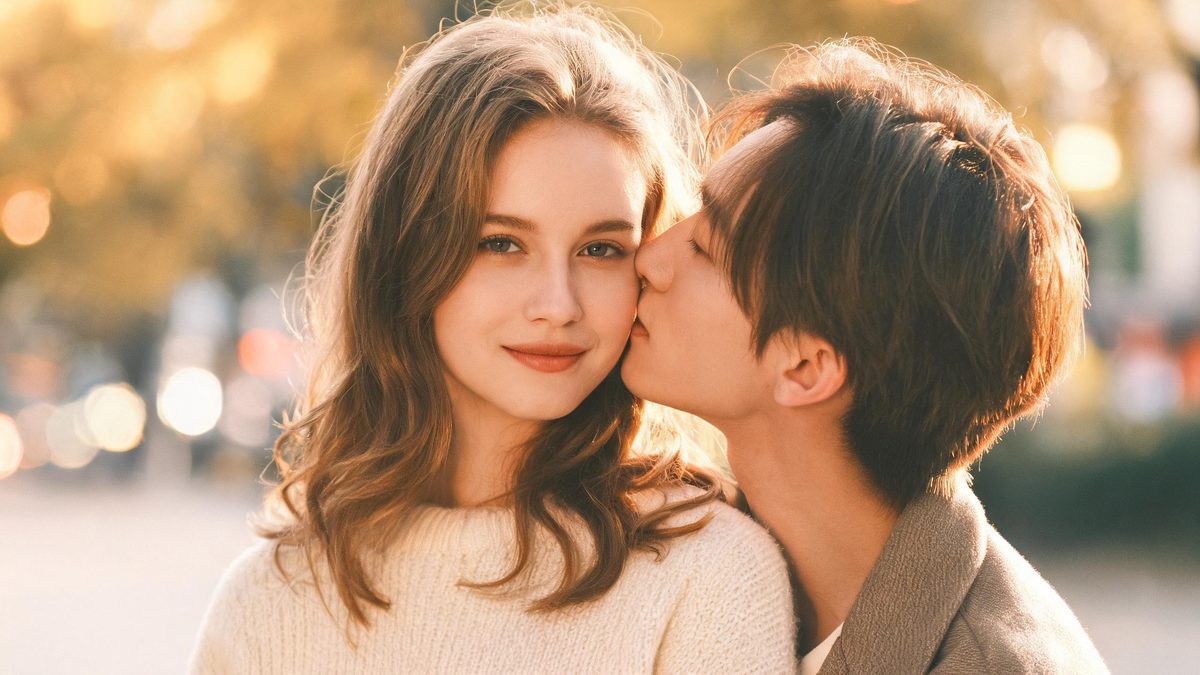
A couple kiss effect works from a single photograph and generates the second person. That is the whole trick, and it is also the thing to understand before you run it: you are not uploading two people who then lean together, you are uploading one person and the effect builds a partner for them inside the same four seconds.
The output is a 4-second 720p video at 60 credits per run, and the frame follows your source photograph. The recommended input is a front-facing half-body shot. Two things can go wrong in the generated partner: a second partner can appear, and the new face is not always complete or turned toward the camera.
Specs at a glance
Straight from the product panel, not from a marketing deck.
- Output
- 4-second video
- Credits
- 60 per run
- Resolution
- 720p
- Aspect ratio
- Matches your input photo
- Input
- 1 photo — one person
- Best results with
- A front-facing half-body shot
- Known limits
- A second partner can appear, and the generated partner does not always come with a complete, front-facing face.
What it does
Built for this specific job, not a generic editor.
One photo is the whole input
There is no second image to find or prepare. The effect generates the partner, so a single well-framed portrait is enough to produce a two-person clip without assembling a matched pair of photographs.
Front-facing half-body framing
A front-facing shot at half body is the recommended input because it puts the face and the upper body where the action happens. That framing gives the generated partner a clear area to occupy.
Source shape preserved
The clip keeps the aspect ratio of the photograph you upload. A vertical portrait remains vertical, which suits a story or short-form placement, and a wide frame stays wide.
Short enough to loop cleanly
Four seconds is long enough for the interaction to register and short enough to repeat without a visible seam. That makes the clip easy to place as an opening beat or a reaction insert.
How it works
Four steps, no timeline to learn.
Pick a front-facing half-body shot
Choose one photograph where the person faces the camera and is framed at roughly the waist up. A clean, well-lit face gives the effect the clearest starting point for the whole interaction.
Leave room beside the subject
Because a partner is generated into the frame, a photograph where the subject sits off-centre with space beside them gives the new person somewhere to be. A tightly cropped portrait leaves less room for the second figure.
Run it and confirm the charge
Add the photo to the couple kiss effect and check the confirmation panel. Each run costs 60 credits from the shared balance, and the amount is displayed in advance.
Inspect the generated face
Play the 4-second 720p result and look at the new person specifically: whether a second partner appeared, and whether the generated face is complete and facing the camera. Those two details are the documented variables.
Where people use it
The jobs this effect actually gets used for.
Anniversary and milestone posts
A solo portrait becomes a paired moment for an anniversary or a milestone. Because the frame follows the source, a square or vertical crop can be prepared for a feed or a story.
Long-distance and reunion content
The effect suits a post about a partner who is away, since it produces a shared frame from one photograph. A front-facing source with space beside the subject gives the second figure room to appear.
Playful couple and friends content
Used lightly, the effect is a way to place two people in one frame without a joint shoot. Judge the generated face before posting, and re-run with a different source if the partner looks incomplete.
Reaction and trend clips
At four seconds the clip is short enough to sit inside a trend or a reaction edit. Its loop-friendly length means it can repeat behind a caption without an obvious restart.

Why the generated partner is the part to judge
You are generating a person who was not in the photograph, so the result has to be reviewed like one.
Every other effect on this site transforms what is already in the frame. This one adds someone. That difference shapes both what the effect can do and how it should be checked, because the new figure is generated rather than copied. The template is built around a single front-facing half-body shot precisely so that the generated person has a clear role in the composition, and the interaction has a defined area to happen in.
The named limits are both about that generated figure. A second partner can appear, which is a structural problem rather than a cosmetic one, and the generated face is not guaranteed to be complete or turned toward the camera. The practical response is to review the new person before you review anything else, since a well-composed frame with an unfinished face will not be usable and a re-run with a different source is the fix.
Choosing a source with space beside the subject is the most useful thing you can control. A portrait where the person fills the frame leaves the effect little room to place a partner, whereas an off-centre subject with background beside them gives the interaction somewhere to sit. That single framing decision does more for the result than any setting, because there are no settings to adjust.
Credits and plans
Every effect draws on one shared credit balance.
Each couple kiss video uses 60 credits from the shared OpenFilmo balance, with the charge shown before confirmation. The Free plan includes 30 credits each month with no credit card required. Starter is $9 for 400 credits, Pro is $19 for 1,000, and Studio is $59 for 4,000.
Related guides
Longer reads on the same workflow, from the OpenFilmo blog.
Image to Video AI: Animate Any Photo in Seconds
A complete guide to image to video AI: what makes a good source image, how to write motion prompts, top use cases, and how to fix …
Character Consistency in AI Video: What Actually Works
How to keep characters consistent across AI video shots: reference images, prompt discipline, key frame locking and post-hoc corre…
AI Video Generator for YouTube: Growth Workflow
How to use an AI video generator for YouTube: B-roll, Shorts, intros and thumbnails, a weekly workflow, plus monetisation and disc…
Related effects
Same family of effects, on the same kind of input.
Frequently asked questions
How does a one-photo kiss video work?
You upload one photograph of a single person and the effect generates the partner. There is no second image to supply, so the result is produced entirely from the framing and quality of the portrait you choose.
How much does a couple kiss video cost?
A run costs 60 credits, and the amount is shown before you confirm. The single charge covers the complete four-second clip, including the generation of the second person, with no additional upload.
What resolution and length does it produce?
The output is a 4-second video at 720p. Its aspect ratio matches the photograph you uploaded, so a vertical portrait stays vertical and drops into a story or short-form placement.
Why does the generated face sometimes look wrong?
The new face is not guaranteed to be complete or facing the camera, and occasionally a second partner appears. Review the generated person first and re-run with a different photograph if the face does not hold up.
What framing gives the best result?
A front-facing half-body shot, ideally with the subject off-centre so there is space beside them. That space is where the generated partner sits, and a tightly cropped portrait leaves less room for it.