
Couple effect
Turn a Couple Photo Into a Cupid Moment
A 4-second clip in which a cupid arrow strikes two people in your photo. One upload, 60 credits, 720p, and the reaction details to expect.
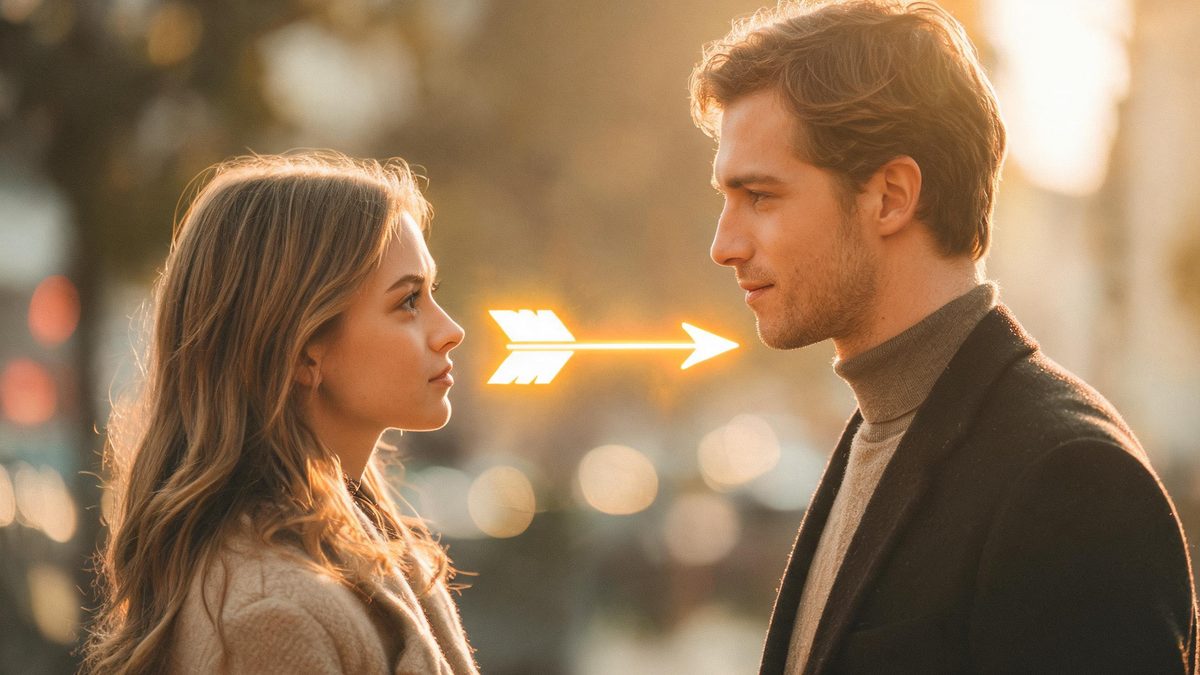
A cupid arrow effect plays a small story: an arrow arrives, and the two people in the frame are meant to feel it. The template takes one photograph of two people and animates that sequence, so the effect is judged as much on the reaction as on the arrow itself.
The output is a 4-second 720p video at 60 credits per run, and the frame follows your source. The recommended input shows more than half of both figures, with their hands free of props. The documented limit is on the reaction end: after the arrow lands, the blush and the eye contact between the two people do not always appear.
Specs at a glance
Straight from the product panel, not from a marketing deck.
- Output
- 4-second video
- Credits
- 60 per run
- Resolution
- 720p
- Aspect ratio
- Matches your input photo
- Input
- 1 photo — two people
- Best results with
- A frame showing more than half of both figures, with no props in their hands
- Known limits
- After the arrow lands, the blush and the eye contact between the two people do not always appear.
What it does
Built for this specific job, not a generic editor.
Two people from one photograph
The effect works from a single image containing both people, with no pairing of separate portraits. One joint photo with both figures visible is the entire input.
More than half of both figures
A frame showing over half of each person is the recommended source. That keeps both faces and torsos in view, which is where the arrow and the reaction both need to read.
Hands free of props
The recommended input has no objects in the subjects’ hands. Empty hands give the effect an unambiguous area to work with, rather than an object it has to account for.
A short story in four seconds
The clip has a beginning, an event and a reaction, all inside four seconds. That structure makes it easy to place as a self-contained post or as a beat in a longer edit.
How it works
Four steps, no timeline to learn.
Pick a two-person frame past half body
Choose one photograph containing both people and showing more than half of each figure. Keeping both faces and torsos visible gives the effect the space to place the arrow and the response.
Keep the hands empty
Where possible, pick a source in which the two people are not holding anything. Props in the hands complicate the frame, and the recommended input has them out of the picture.
Run it and confirm the charge
Add the image to the cupid effect and review the confirmation panel. Each run costs 60 credits from the shared balance, and the amount appears before you confirm.
Judge the reaction as well as the arrow
Play the 4-second 720p result and check both halves of the story: that the arrow lands as expected, and that the two people respond to it. The reaction detail is the part named as unreliable.
Where people use it
The jobs this effect actually gets used for.
Romantic and Valentine content
The effect has an obvious home around romantic occasions and seasonal prompts. A frame showing both people past half body gives the arrow and the response room to read.
Anniversary and couple posts
A couple photograph becomes a small animated moment for a milestone post. Both figures need to be visible so the reaction can be shared between them.
Playful friend and duo content
Used lightly, the effect works for two friends as well as a couple. Keep the framing wide enough for both faces, and treat the result as a light visual gag.
Story and reaction inserts
Four seconds is short enough to sit inside a longer sequence as a beat. Because the frame follows the source, a vertical image drops into a phone-first placement.

Why the reaction is the hard part of the arrow
The arrow is the easy half; making two people respond is where the effect earns its limits.
A cupid effect asks for something subtle: not a transformation, and not a movement, but a change in expression and attention between two people. The arrow itself is a graphic event, and the effect handles that part consistently. The response is harder, because it requires the two faces to react to something and then to each other, which is a small amount of acting invented from a still photograph.
That is why the documented limit concerns the blush and the eye contact. When either is missing, the clip can still read as a cupid moment because the arrow and the framing carry the idea, but it loses the beat that makes the effect feel intentional rather than decorative. Reviewing the reaction before you post is therefore part of the workflow, and re-running with a different source is the response when it does not appear.
The input advice is built to give the reaction the best chance. A frame that shows more than half of both figures keeps both faces and torsos in view, and empty hands remove objects that would otherwise compete for the effect’s attention. Neither condition guarantees the blush, but together they put the two people in the frame where a shared reaction is most likely to be read, which is the most control you have over this template.
Credits and plans
Every effect draws on one shared credit balance.
Each cupid video uses 60 credits from the shared OpenFilmo balance, with the charge shown before confirmation. The Free plan includes 30 credits each month with no credit card required. Starter is $9 for 400 credits, Pro is $19 for 1,000, and Studio is $59 for 4,000.
Related guides
Longer reads on the same workflow, from the OpenFilmo blog.
Image to Video AI: Animate Any Photo in Seconds
A complete guide to image to video AI: what makes a good source image, how to write motion prompts, top use cases, and how to fix …
Character Consistency in AI Video: What Actually Works
How to keep characters consistent across AI video shots: reference images, prompt discipline, key frame locking and post-hoc corre…
AI Video Generator for YouTube: Growth Workflow
How to use an AI video generator for YouTube: B-roll, Shorts, intros and thumbnails, a weekly workflow, plus monetisation and disc…
Related effects
Same family of effects, on the same kind of input.
Frequently asked questions
What photo should I upload for a cupid video?
One photograph containing two people and showing more than half of each figure, with the hands free of props. Keeping both faces and torsos visible gives the arrow and the reaction room to read.
How much does a cupid video cost?
A run costs 60 credits, shown before you confirm. The single charge covers the complete four-second clip, with no second photograph and no extra step to describe the arrow.
Why do the two people not react to the arrow?
The blush and the eye contact between the two people do not always appear after the arrow lands. That is a documented limit of this effect, so review the reaction before posting and re-run with a different source if it is missing.
What resolution and length does it produce?
The output is a 4-second video at 720p, and its aspect ratio matches the photograph you uploaded. The clip contains the arrival of the arrow and the response, all inside four seconds.
Should the two people be holding anything?
The recommended input has no props in the hands. Empty hands give the effect a clear area to work with, so a source where the two people are not holding anything is the safer choice.