
New Year effect
One Photo, One Figure, One Handover
The simplest version of the New Year handover: one person, one generated figure, one exchange of red envelopes. Nothing to type, nothing to composite, and the cheapest of the group at 45 credits.
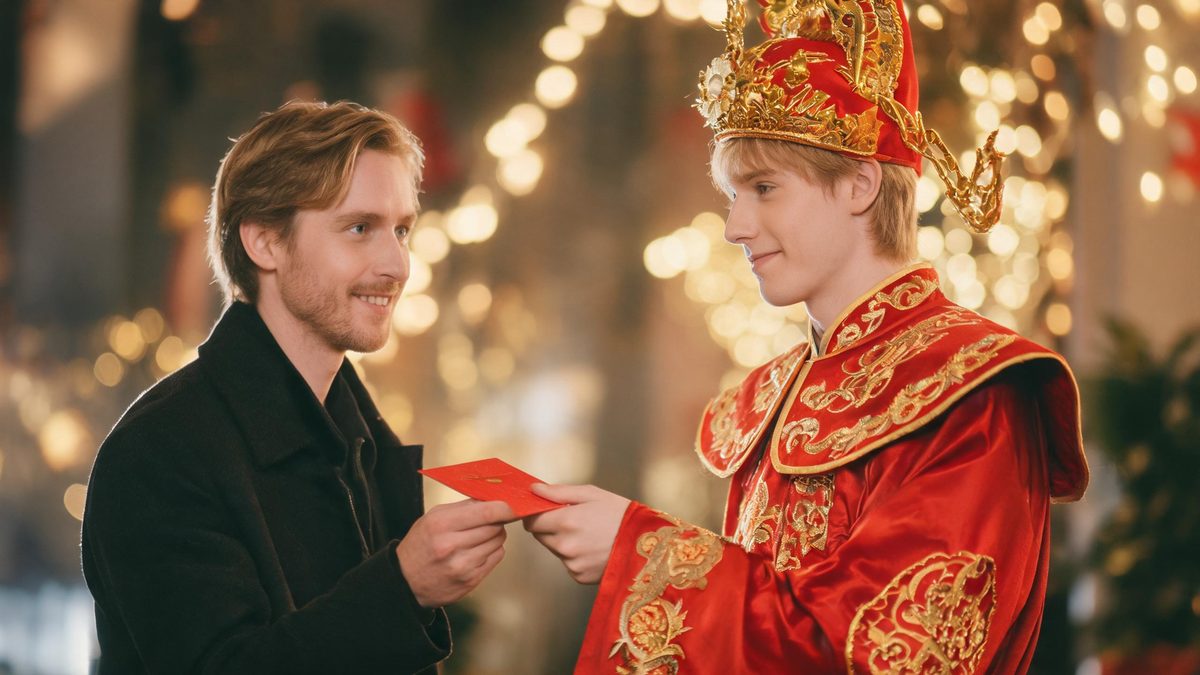
Most celebration effects need either a careful prompt or several photos. This one needs neither. You upload a single photo of one person, and the effect generates the God of Wealth figure beside them and completes the handover of red envelopes.
Because there is no text prompt at all, the source photo is the only thing you control — which makes photo choice the whole skill. What comes back is a 5-second 720p video in the aspect ratio of your source photo, for 45 credits per run, the lowest cost in this group.
Specs at a glance
Straight from the product panel, not from a marketing deck.
- Output
- 5-second video
- Credits
- 45 per run
- Resolution
- 720p
- Aspect ratio
- Matches your input photo
- Input
- 1 photo — one person, half-body or full-body
- Best results with
- A single front-facing subject framed from the waist up, standing clear of the frame edges
- Known limits
- Single subject only — a two-person photo is not accepted by this version. There is no text prompt at all, so the source photo is the only thing you control: framing, lighting and what the subject is holding. The God of Wealth figure and the envelopes are generated around your subject rather than composited from your own images.
What it does
Built for this specific job, not a generic editor.
No prompt, no guesswork
This version runs without a text prompt. That removes a whole class of failure — a prompt that fights the template — and it means the result is determined by your photo and nothing else.
The figure is generated around you
The God of Wealth is built into the scene beside your subject rather than composited from an image you supply, so the lighting and the scale match automatically. You do not need to find a usable figure photo.
Five seconds, not four
This version runs a second longer than the rest of the group, which gives the handover room to land rather than snapping from a stand to an exchange in four beats.
Real output specs
Five seconds at 720p, aspect ratio inherited from your source photo, 45 credits per run, shown before you confirm. The free tier includes 30 credits every month.
How it works
Four steps, no timeline to learn.
Choose one clean subject
This version accepts a single subject only. Pick a front-facing photo of one person, framed from the waist up or full body, standing clear of the frame edges so the figure has room to stand beside them.
Leave the hands empty
The handover needs both hands free. A phone, a cup or a bag strap in the source photo will compete with the envelopes and usually wins.
Watch the exchange, not the figure
The beat that matters is the envelopes changing hands. If they appear already held with no movement, the source framing was too tight for the arm to travel.
Re-run with a different photo
With no prompt to adjust, a different photo is the only lever you have. At 45 credits a run it is the cheapest effect in the group to experiment with, but it is still worth choosing well first.
Where people use it
The jobs this effect actually gets used for.
A New Year greeting to family
The clip is short, legible and needs no caption. It reads as a greeting that was already happening when the camera arrived.
A profile or avatar animation
Five seconds at 720p is enough to loop as a small animated avatar or a story sticker without any editing step.
A beat in a longer recap
The handover is a clean single beat that drops into a longer edit as a transition between two sections.
Testing the cheapest effect first
At 45 credits this is the least expensive way to see what generated celebration footage actually looks like before committing to a larger batch.

Why the cheapest effect is often the right one
Fewer inputs, fewer prompts, fewer ways to go wrong.
Every control an effect offers is also a way to misuse it. A prompt can fight the template; a second image can disagree with the first; a third can break the scale. Removing all three does not make the effect weaker — it makes the result predictable.
What is left is the photo. Framing, lighting and empty hands carry the entire result, which is a much shorter list to get right than a prompt plus a stack of reference images.
The trade-off is stated plainly: single subject only, no prompt, and a figure generated around your subject rather than chosen by you. For a greeting clip that is usually exactly what you want.
Credits and plans
Every effect draws on one shared credit balance.
Every effect draws on the same credit balance. This one costs 45 credits per run — the lowest in this group — and the cost is shown before you confirm. Free accounts receive 30 credits every month with no card and no watermark on the output, which covers a single run.
Related guides
Longer reads on the same workflow, from the OpenFilmo blog.
Image to Video AI: Animate Any Photo in Seconds
A complete guide to image to video AI: what makes a good source image, how to write motion prompts, top use cases, and how to fix …
Character Consistency in AI Video: What Actually Works
How to keep characters consistent across AI video shots: reference images, prompt discipline, key frame locking and post-hoc corre…
AI Video Cost Per Minute: The Real Numbers in 2026
How to calculate true AI video cost per finished minute: generation price, regeneration waste, edit time and iteration, with worke…
Related effects
Same family of effects, on the same kind of input.
Frequently asked questions
Do I need a photo of the God of Wealth?
No. The figure is generated around your subject, so you only supply one photo of one person. Other templates in the library do ask for extra images — this one does not.
Can I write a prompt to change the scene?
No. This version has no text prompt, which is deliberate: the result is determined by your photo alone. Framing, lighting and empty hands are the only levers.
Why is this one 5 seconds and 45 credits?
Five seconds at 720p and 45 credits per run are the fixed specifications of this version, published here so you know before you spend credits. It is the cheapest effect in this group.
Can I use a photo of two people?
No. This version accepts a single subject only. For two people in one photo, the finger heart or fireworks templates accept groups instead.
Can I use the clip commercially?
Yes. Output is yours to publish, including in paid posts, on every plan including the free tier. The only restriction is the source photo: use an image you own or have permission to use.