
Trending effect
Try The Shade Before The Salon Does
A hair colour decision costs hours and grows out for months. This effect costs 40 credits and four seconds: one portrait in, the same person with a different shade on camera, no prompt to write.
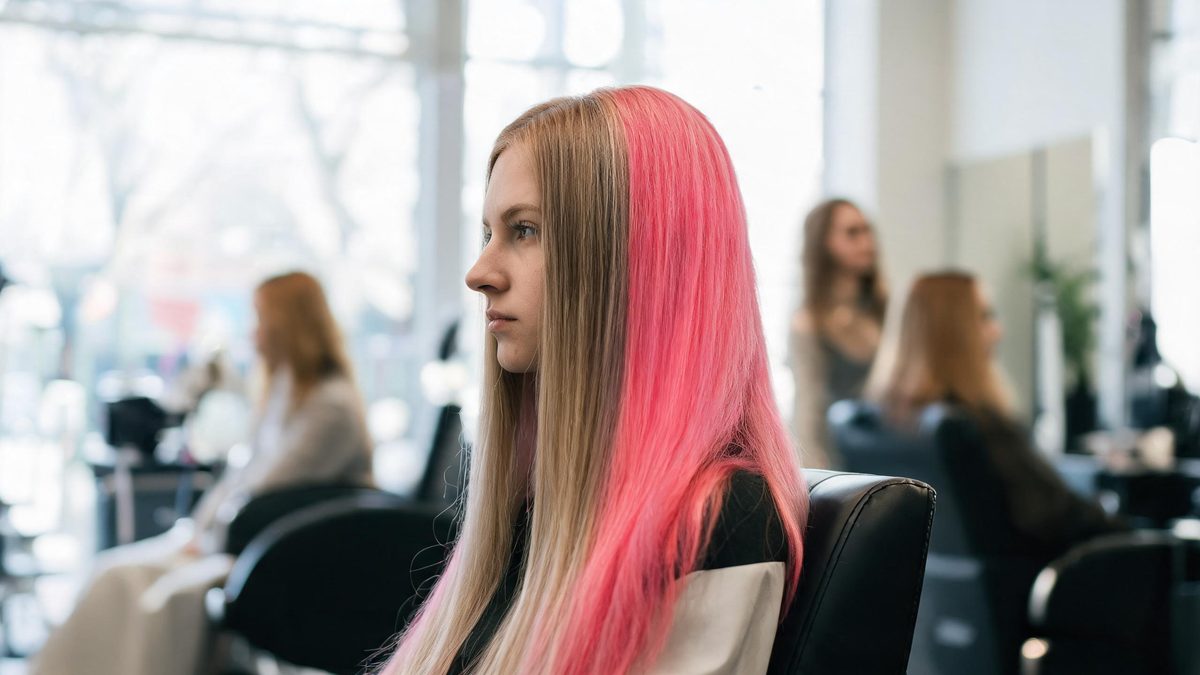
The colour-hunting behaviour that is everywhere this year — testing a dozen shades digitally before booking anything — broke because most tools return a still. A still cannot show how a shade moves when you turn your head, which is the whole basis of choosing one.
This template works in video. One portrait in, a 4-second 720p clip out, with the shade applied on camera for 40 credits. It accepts single or multiple people and even pets, takes no text prompt, and returns the result in your photo’s own aspect ratio. Because the motion is generated from your real portrait, the shade reads the way it would on you — not on a model.
Specs at a glance
Straight from the product panel, not from a marketing deck.
- Output
- 4-second video
- Credits
- 40 per run
- Resolution
- 720p
- Aspect ratio
- Matches your input photo
- Input
- 1 photo — one or more people, or one or more pets
- Best results with
- The subject facing the camera or in a clean profile view
- Known limits
- No text prompt — the shade comes from the template presets, not from a description you type. In a small share of runs the hairstyle itself drifts from the source photo, and hair accessories can fuse into the new hair. Background music is off unless the API request turns it on.
What it does
Built for this specific job, not a generic editor.
Video, not a still
The output is a moving clip, so you see the shade against your skin tone as you move. That is the information a colour swatch cannot give you and the reason to pick this over a photo filter.
No prompt to write
The shade comes from the template presets. If you have ever spent twenty minutes rewording "ash blonde" into a prompt, this is the more predictable arrangement: choose, run, review.
Pets included
The template accepts pet photos, so the same run that tests your shade can give the family dog a fantasy colour for a post. Multi-person photos are accepted too.
Silent by default
Background music is off unless the API request turns it on. The clip drops into an edit with your own audio without a strip-out step.
How it works
Four steps, no timeline to learn.
Face the camera or go clean profile
Front-facing and clean side-profile portraits are the inputs the template handles best. A three-quarter back view hides the hairline, which is exactly where a colour change has to be convincing.
Check the hairstyle after the shade
In a small share of runs the hairstyle itself drifts slightly from the source photo. If the shape changed as well as the colour, re-run — the shade application is the reliable part.
Watch hair accessories
Clips, bands and pins can fuse into the new hair. For a trial run that you will actually base a salon decision on, remove accessories first or accept that the preview ignores them.
Run the shades side by side
At 40 credits a run, the practical workflow is one run per candidate shade on the same photo, then compare the clips. Same face, same light, same motion — only the colour moves.
Where people use it
The jobs this effect actually gets used for.
The pre-salon trial
Bring the clip to your colourist instead of a saved photo of someone else. A shade previewed on your own head in motion is the closest thing to a fitting the industry currently has.
Seasonal colour content
Creators run a portrait through several shades for a carousel or a stitched clip. The consistent source photo makes the comparison fair and the series bingeable.
Character looks for shoots
Before committing to a wig, test the shade on camera. Four seconds is enough to judge how a colour reads under your actual lighting setup.
A pet post with zero risk
The pet version is pure content — a fantasy shade on the family cat posts perfectly and costs the same 40 credits.
Why a moving preview changes the decision
Colour is not a surface, it is a behaviour — and behaviour only shows in motion.
A still can lie about hair colour because it freezes the two things that matter: how the shade shifts as the head turns, and how it sits against your skin in natural light. Video keeps both honest, which is why clip-based try-ons are replacing swatch selfies.
The no-prompt design is the other half of the reliability. Describing a shade in text is where most AI try-ons go wrong — "honey beige" means six different colours to a model. Preset shades remove the ambiguity entirely.
The honest limits: hairstyles can drift slightly and accessories can fuse. Both are visible on review, and both are fixed by a clean source photo. At 40 credits, verifying a shade before a salon appointment is the cheapest decision support you will get this year.
Credits and plans
Every effect draws on one shared credit balance.
Every effect draws on the same credit balance. This one costs 40 credits per run, shown before you confirm. Free accounts receive 30 credits every month with no card and no watermark on the output.
Related guides
Longer reads on the same workflow, from the OpenFilmo blog.
Image to Video AI: Animate Any Photo in Seconds
A complete guide to image to video AI: what makes a good source image, how to write motion prompts, top use cases, and how to fix …
Character Consistency in AI Video: What Actually Works
How to keep characters consistent across AI video shots: reference images, prompt discipline, key frame locking and post-hoc corre…
AI Video Prompt Formulas That Hold Up in Production
Prompt structures that work for AI video: subject, motion, camera, time and style — with tested formulas, failure patterns and a m…
Related effects
Same family of effects, on the same kind of input.
Frequently asked questions
Can I type a specific shade?
No. There is no text prompt on this template — shades come from the presets. That is deliberate: describing a colour in words is the least reliable way to get it.
Does it work on pets?
Yes. The template accepts one or more pets as well as single or multiple people, at the same 40 credits per run.
My hairstyle changed as well as the colour. Why?
In a small share of runs the hairstyle drifts from the source photo. The shade application is the dependable part — re-run if the shape changed too.
What happened to my hair clip?
Hair accessories can fuse into the new hair during the restyle. Remove clips and bands for a clean trial, or accept the preview ignores them.
What is the output spec?
A 4-second 720p clip in the aspect ratio of your input photo, 40 credits per run. Background music is off unless the API request turns it on.