
Warm moment effect
A Kiss Blown Straight at the Lens
A small gesture with a clear direction: hand to lips, then out to the camera. This effect adds that motion to a photo of one or two people for 40 credits, in four seconds at 720p.
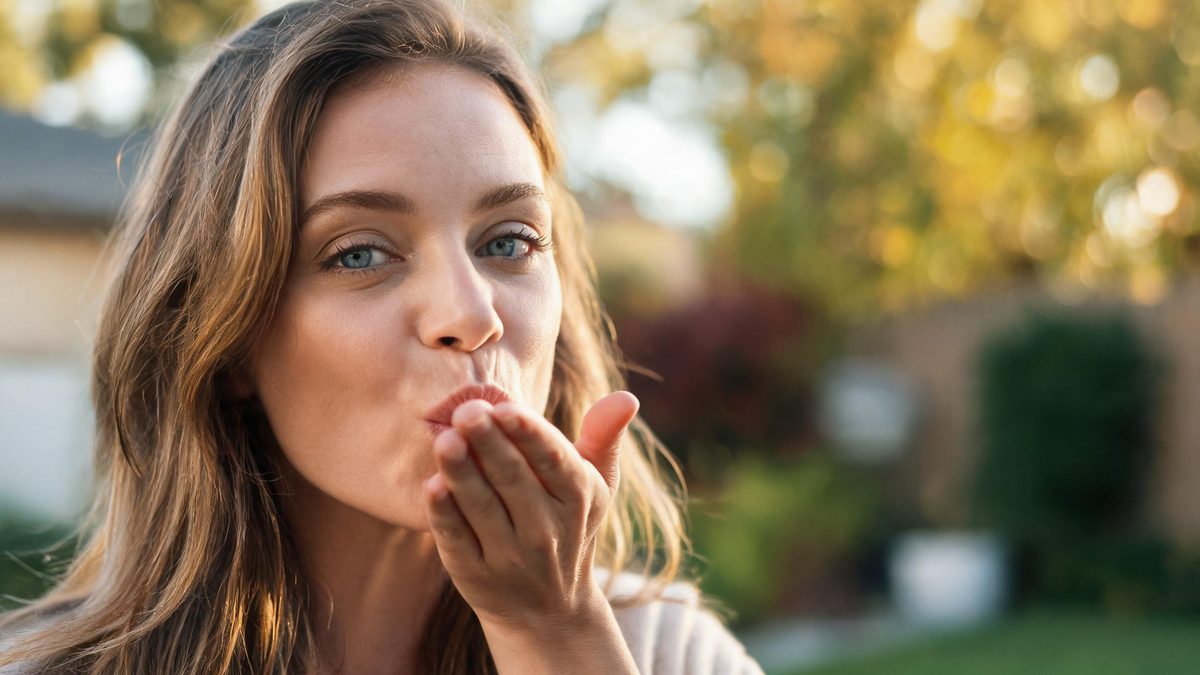
Blown kisses work in short video because they address the viewer directly. The gesture has a start point on the face and an end point at the lens, so even a four-second clip has a legible arc.
The effect takes one photo containing one or two people and animates the gesture, returning a 4-second 720p video for 40 credits. Close and medium frames behave differently from wide ones, and that difference is worth knowing before you upload.
Specs at a glance
Straight from the product panel, not from a marketing deck.
- Output
- 4-second video
- Credits
- 40 per run
- Resolution
- 720p
- Aspect ratio
- Matches your input photo
- Input
- 1 photo — one person or two people
- Best results with
- A close or medium frame with empty hands, subject looking at the camera
- Known limits
- A wide source gets a fast push-in before the gesture, which can feel rushed rather than cinematic. Anything held in the hands — a phone, a drink, a bag strap — breaks the gesture, and the kiss itself is a hand-to-lips motion rather than a lip close-up.
What it does
Built for this specific job, not a generic editor.
Works with one or two people
Unlike the partner-generating effects, this one animates whoever is already in the photo — one person or a pair — which makes it useful for couples and solo content alike.
Camera push-in on wide sources
If the source is a wide or medium shot, the camera moves in before the gesture, ending close on the face. That built-in move is what keeps the gesture readable at four seconds.
Hands matter more than faces
The motion is hand-to-lips, so empty hands are essential. A phone, cup or bag strap in the frame is the single most common reason this effect fails to read.
Forty credits, fixed spec
Four seconds, 720p, aspect ratio matched to source, 40 credits per run — the same shape as the other single-subject warm effects.
How it works
Four steps, no timeline to learn.
Start from a close or medium frame
If the photo is already close, the clip opens directly on the gesture. That is the cleanest version of the effect and avoids the fast push-in that wide sources trigger.
Clear the hands
Empty hands give the effect room to form the gesture. Anything held competes for the same pixels and usually breaks the motion partway through.
Face the camera
This is a gesture aimed at the viewer, so the subject should be looking more or less into the lens. A profile shot gives the effect nothing to aim at.
Run it, then check the hand path
The giveaway is whether the hand travels from the lips outward. If the gesture appears as a static pose rather than a movement, try a tighter, more frontal photo.
Where people use it
The jobs this effect actually gets used for.
Lighthearted greetings
A blown kiss is a friendly sign-off. It suits a story post or a message where a plain photo would feel expressionless.
Couple content without a second person
Because it accepts one or two people, couples can use it on solo photos and still produce a clip that reads as affectionate.
Personal-brand posts
Creators who front their own content can use the clip as a soft, non-promotional beat between harder selling posts. Short, unmistakably human, no script needed.
Anniversary and countdown inserts
Four seconds fits a countdown series or a highlight reel as a single beat, and the direct-to-camera gesture keeps continuity across clips.
Why a small gesture survives four seconds
Short clips reward actions that have a clear beginning and end.
Four seconds is not enough time for a complex action, which is why so many image-to-video results feel unfinished. A blown kiss fits the window precisely: hand up, hand out, done.
The direction also helps. Because the gesture points at the lens, the viewer is addressed rather than observed, and that makes the clip feel personal even though the subject is a still photograph.
The one thing the effect cannot recover from is clutter. Hands that are already holding something have no room to perform, so the framing advice on this page is not decoration — it is the difference between a gesture and a frozen pose.
Credits and plans
Every effect draws on one shared credit balance.
Forty credits per run, shown before you confirm. The free allowance is 30 credits monthly with no card required and no watermark on output; the paid plans add credits, faster queues and parallel jobs. Current numbers are on the pricing page.
Related guides
Longer reads on the same workflow, from the OpenFilmo blog.
Image to Video AI: Animate Any Photo in Seconds
A complete guide to image to video AI: what makes a good source image, how to write motion prompts, top use cases, and how to fix …
AI Video Prompt Formulas That Hold Up in Production
Prompt structures that work for AI video: subject, motion, camera, time and style — with tested formulas, failure patterns and a m…
AI Video Generator for YouTube: Growth Workflow
How to use an AI video generator for YouTube: B-roll, Shorts, intros and thumbnails, a weekly workflow, plus monetisation and disc…
Related effects
Same family of effects, on the same kind of input.
Frequently asked questions
How many people can be in the photo?
One or two. Unlike the partner-generating effects, this template animates the people already in the image and does not add a new figure, which is why it costs 40 credits rather than 60.
Why does my clip start with a fast zoom?
That push-in is built into the effect for wide and medium sources: the camera moves in so the gesture ends close on the face. Starting from a close-up photo skips the move entirely.
Will it work if the subject is holding something?
Usually not well. The effect needs the hand free to travel from the lips outward, so a phone, drink or bag strap in frame typically breaks the motion.
Can I use it on a profile photo?
Technically yes, but a profile gives the gesture no direction to point at. A three-quarter or front-facing photo reads far better, because the kiss is aimed at the lens.
Is the result royalty free?
You own the output and can publish it commercially on any plan, including the free one. Your only obligation is holding the rights to the photo you uploaded.