
Transformation effect
Step Onto a Snowy Red Carpet
A 4-second clip that places the subject of your photo on a red carpet under falling snow. One upload, 60 credits, 720p, with the aspect-ratio and input rules stated.
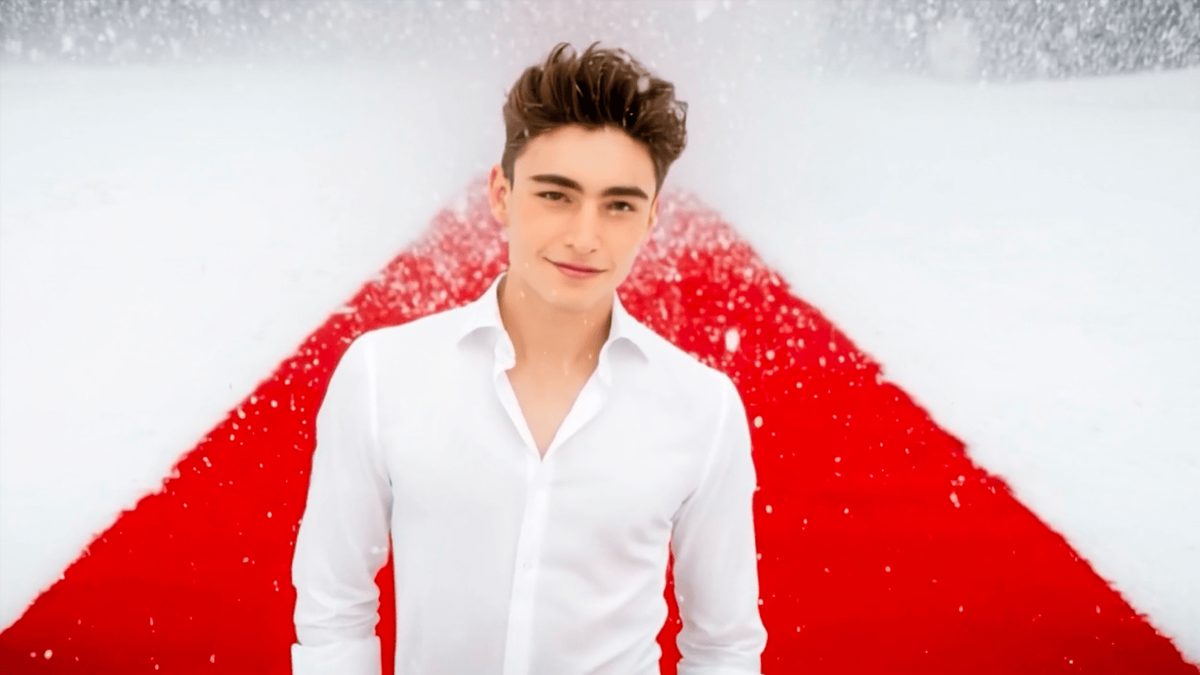
Snow Red Carpet places the subject of a single photograph on a red carpet under falling snow, turning a still portrait into a short cinematic entrance. The template takes one image and animates the walk, so the appeal is the moment of arrival rather than a dramatic change of form.
The output is a 4-second 720p video at 60 credits per run, and the clip can be produced in 16:9, 9:16, or 1:1. It accepts one person or one pet in the same upload slot, with a half-body or full-body human frame or a full-body pet frame giving the steadiest result.
Specs at a glance
Straight from the product panel, not from a marketing deck.
- Output
- 4-second video
- Credits
- 60 per run
- Resolution
- 720p
- Aspect ratio
- 16:9, 9:16, or 1:1
- Input
- 1 photo — one person or one pet
- Best results with
- A half-body or full-body shot of one person, or a full-body shot of one pet
- Known limits
- The subject can walk off the red carpet or fail to step onto it at all.
What it does
Built for this specific job, not a generic editor.
Cinematic snow entrance
The effect adds gently falling snow and a lit red carpet so a plain portrait reads as a gala arrival. The motion is a slow walk-on rather than a costume change, which keeps the subject recognizable.
One person or one pet
A single person or a single pet fits the same slot. A half-body or full-body human shot or a full-body pet shot gives the effect a clear subject to place on the carpet.
Three aspect ratios
The clip can be rendered in 16:9, 9:16, or 1:1, so the same photograph works for a widescreen post, a vertical story, or a square thumbnail without a separate crop.
Source proportions preserved
The finished clip keeps the aspect ratio you choose from the three options, and the framing you shot is the framing you get, with no forced recrop after the fact.
How it works
Four steps, no timeline to learn.
Pick a clear walk-on frame
Choose one photograph of a person (half or full body) or a pet (full body). A subject that already stands upright reads best as a carpet walk-on.
Choose an aspect ratio
Select 16:9, 9:16, or 1:1 before you run. A vertical 9:16 suits a story, while 16:9 suits a feed post.
Run it and confirm the cost
Add the image to the Snow Red Carpet effect and check the confirmation panel. Each run costs 60 credits from the shared balance, shown before you confirm.
Check the walk and the carpet
Watch the 4-second 720p result and note whether the subject stays on the carpet and walks at a natural pace. Those are the named variables.
Where people use it
The jobs this effect actually gets used for.
Award-season and gala posts
A portrait becomes a red-carpet arrival, which suits a fan account or a personal milestone during award season. A half-body frame gives the subject a clear stance.
Winter and holiday content
The falling snow makes the effect fit a winter campaign or a holiday card. A simple background keeps the focus on the subject and the carpet.
Pet spotlight moments
A full-body pet shot can take the same walk, which suits a pet account or a playful brand post. Keep the pet centered so it lands on the carpet.
Event invitations
A single portrait can be presented as a gala invite teaser. A vertical 9:16 frame works well as a story cover.
Why the walk matters more than the wardrobe
This effect sells an entrance, so the subject’s motion is the whole point.
Snow Red Carpet is built around arrival, not transformation. The subject does not change form; they step onto a carpet under snow, and the interest comes from the walk itself. That is why the recommendation is a frame where the subject already stands upright and faces forward: a pose that reads as walking-in is far easier for the effect to animate than a seated or lying-down shot.
The aspect ratio choice is the other practical decision. Because the effect supports 16:9, 9:16, and 1:1, the same photograph can feed a widescreen post, a vertical story, or a square thumbnail. Picking the ratio up front avoids a forced recrop later, and it lets the subject’s stance fill the frame the way you intended.
The named risk is the walk itself. The subject can stray off the red carpet or fail to step onto it at all, which breaks the gala premise. A centered, upright subject with clear space around the feet gives the effect the cleanest path onto the carpet, and checking the result early tells you whether to try a different frame.
Credits and plans
Every effect draws on one shared credit balance.
Each Snow Red Carpet video uses 60 credits from the shared OpenFilmo balance, with the charge shown before confirmation. The Free plan includes 30 credits each month with no credit card required. Starter is $9 for 400 credits, Pro is $19 for 1,000, and Studio is $59 for 4,000.
Related guides
Longer reads on the same workflow, from the OpenFilmo blog.
Image to Video AI: Animate Any Photo in Seconds
A complete guide to image to video AI: what makes a good source image, how to write motion prompts, top use cases, and how to fix …
Character Consistency in AI Video: What Actually Works
How to keep characters consistent across AI video shots: reference images, prompt discipline, key frame locking and post-hoc corre…
AI Video Prompt Formulas That Hold Up in Production
Prompt structures that work for AI video: subject, motion, camera, time and style — with tested formulas, failure patterns and a m…
Related effects
Same family of effects, on the same kind of input.
Frequently asked questions
What can I upload to Snow Red Carpet?
One photograph of a person (half or full body) or a pet (full body). A subject that stands upright and faces forward gives the most predictable walk-on.
How much does a Snow Red Carpet video cost?
A run costs 60 credits, shown before you confirm. One charge covers the full four-second clip whether the photograph shows a person or a pet.
What resolution and length does it produce?
The output is a 4-second video at 720p, and you can choose 16:9, 9:16, or 1:1. The clip keeps the ratio you select.
Can I use a pet instead of a person?
Yes. A single pet in a full-body frame fits the same slot. Keep the pet centered so it lands on the carpet rather than beside it.
Why did the subject walk off the carpet?
The effect can let the subject stray off the red carpet or miss it entirely. A centered, upright frame with clear space around the feet reduces that risk; check the result and retry a different pose if needed.